


Table of Contents
If you’ve spent any time in the creative entrepreneur space, you’ve heard about Showit. Maybe someone in your photographer Facebook group mentioned it, or you landed on a beautifully designed website and noticed “Built on Showit” in the footer. However you got here, you’re doing the right thing: researching before you commit.
Here’s something I want to be upfront about first. We sell Showit templates. We’ve built our entire business around the Showit website builder. Davey and I have been designing on this platform for years, and I was named Showit’s Designer of the Year. So yes, I’m biased.
But I’ve also talked to hundreds of people who’ve struggled with the platform, run into real limitations, and occasionally wished they’d chosen something else. I’ve seen where the Showit website builder shines and where it falls short. So this review is going to give you both sides, as clearly as I can, because the last thing I want is for you to invest your time, money, and energy into something that isn’t right for your business.
Let’s get into it.
What the Showit Website Builder Actually Is (and What It Isn’t)
The Showit website builder is a drag-and-drop platform that runs on a WordPress backend. That combination is actually pretty unique: you get the visual design freedom of a true drag-and-drop builder (think Canva-level flexibility, but for full websites) paired with WordPress’s powerful blogging and SEO infrastructure.
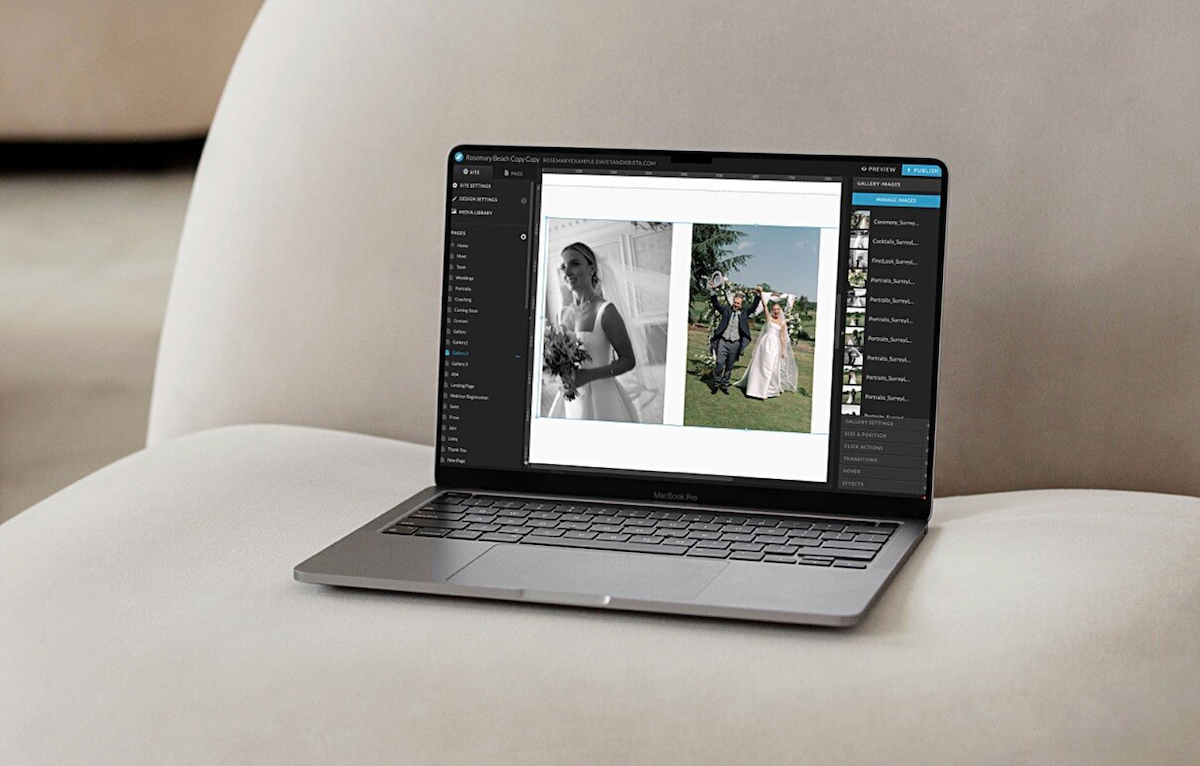
What it is not is a traditional builder like Squarespace, or a fully coded platform like Webflow. It lives somewhere in between: more flexible than Squarespace, more accessible than Webflow, more design-forward than WordPress page builders.
It’s also not an all-in-one platform. There’s no built-in e-commerce, booking tools, or email marketing. You’ll need to integrate those pieces separately, and we’ll talk more about that below.
What the Showit Website Builder Does Really, Really Well
Design Freedom That Actually Delivers
Here’s what separates the Showit website builder from almost every other platform aimed at creatives: there are essentially no layout constraints. You’re not working within columns, blocks, or a grid that someone else decided on. Every element, whether that’s text, images, shapes, or buttons, can go exactly where you want it on the page.
That sounds simple, but it’s genuinely transformative for designers and design-forward business owners. You can build layered, editorial layouts with overlapping elements. You can create custom hero sections that don’t look like every other website in your industry. You can make something that looks like it cost $10,000 to build without writing a single line of code.
For photographers especially, this matters a lot. Your website is your portfolio. It needs to show your work in a way that feels as intentional and beautiful as the images themselves. The Showit website builder lets you do exactly that.
The Mobile Design Experience
Most website platforms handle mobile responsiveness automatically, which sounds great until you realize “automatically” often means your carefully crafted desktop layout becomes a jumbled mess on someone’s phone. The Showit website builder takes a different approach: you design your mobile site separately.
I know what you’re thinking. That sounds like more work. And honestly, yes, it does take more time upfront. But what you get in exchange is complete control over your mobile experience. You decide what shows on mobile and what doesn’t. You decide the spacing, the layout, the font sizes. Nothing gets distorted or awkwardly stacked without your say-so.
Given that the majority of website traffic now comes from mobile devices, that level of control is genuinely valuable. And if you’re starting from a template, the mobile design work is largely done for you.
WordPress Blog Integration
The SEO case for WordPress is well established. The blogging infrastructure, the plugin ecosystem, the way search engines interact with WordPress content: it’s been refined over decades. The Showit website builder gives you all of that without forcing you to design your website inside WordPress itself, which is where things tend to get clunky.
Your blog posts live in WordPress. Your visual website lives in Showit. The two connect seamlessly, and you end up with a platform that’s genuinely strong for content marketing and long-term SEO. For anyone building a content strategy around blog posts, long-form guides, or SEO-driven traffic, this matters. You’re not giving up blogging infrastructure just to have a beautiful website.
The Template Ecosystem
Because Showit has built a loyal community of designers, the template ecosystem is robust and genuinely beautiful. You’re not sorting through the same generic layouts you’d find on other platforms. Most Showit templates are built by experienced brand and web designers, which means the layouts are thoughtful, the typography pairings are considered, and the overall quality is high.
Templates also make the Showit website builder much more accessible for people who don’t want to design from a blank canvas. You can start with a professionally designed foundation and customize it to fit your brand: colors, fonts, images, and copy, without having to make every single layout decision yourself.
Full disclosure: this is our business. But I’d say the same thing regardless, because a well-built template is genuinely one of the most efficient paths to a strategic, beautiful website. Browse our Showit templates here.
Customer Support
Showit’s customer support is genuinely good, and I don’t say that lightly. They have live chat support during business hours, a solid knowledge base, and an active community. For a platform aimed at non-developers, responsive human support matters. If you get stuck, you’re not going to be left searching through a help forum hoping someone else had the same problem.
Where the Showit Website Builder Falls Short
The Learning Curve Is Real, But It’s Manageable
The Showit website builder’s design freedom comes with a tradeoff: it takes time to learn. When everything can go anywhere, you have to develop a sense of how to organize your canvas, how to name and group elements, and how to build cleanly so edits stay manageable later.
For people who are used to block-based editors like Squarespace, Showit’s interface can feel disorienting at first. There’s no automatic column structure to guide you. You’re working with more freedom than most people are initially comfortable with.
That said, this is genuinely solvable. Showit has tutorials and a solid knowledge base, and there’s an active community of designers and users who share tips and resources. The honest caveat: if you want zero learning involved and prefer to click around intuitively from day one, this probably isn’t the platform for you. But if you’re willing to invest some time upfront, you’ll have a website you’re genuinely proud of and the skills to maintain it yourself going forward.
Pricing Structure
The Showit website builder operates on a subscription model. Plans start at $22/month (billed annually) for the basic website-only plan, $27/month for the Basic Starter Blog plan, and $39/month for the Advanced Blog plan, which is what most people building a content-driven site will want.
That ongoing cost is something to build into your business budget. For many creative entrepreneurs, the investment is absolutely worth it. But it is a recurring expense, not a one-and-done purchase. And if you stop paying, your site goes offline.
No Native E-Commerce
If you want to sell products directly through your site, you’ll need a third-party integration. The Showit website builder doesn’t currently have built-in e-commerce functionality the way Squarespace does, though it’s worth noting this is an area the platform continues to develop.
In the meantime, most people use WooCommerce (which plugs into the WordPress backend) or embed tools like ThriveCart or Shopify buy buttons. This works fine; we do it ourselves. But it’s worth knowing upfront that you’re building a slightly more complex tech stack than you would on a platform with native e-commerce. More pieces means more to manage.
The Canvas Can Get Messy
This is the thing nobody really talks about: because the Showit website builder gives you so much freedom, it’s easy to create a site that becomes hard to maintain over time. Elements stacked on top of each other, inconsistent spacing, unnamed layers. If you’re not thoughtful about how you build, you’ll end up with a site that’s frustrating to edit six months down the road.
This is less a platform problem and more a best-practices problem, but it’s worth naming. Building cleanly takes intention. Templates help enormously here because they come pre-organized. But if you’re building from scratch without a design background, you may find yourself creating headaches for future you.
How the Showit Website Builder Compares to the Alternatives
Showit vs. Squarespace
Squarespace is easier to learn and has a more polished out-of-the-box experience. It also includes e-commerce, scheduling, and email marketing natively. For a business owner who wants one clean platform that handles most things without complexity, Squarespace is a legitimate choice.
Where Squarespace falls short is design flexibility. You’re always working within their block and column system, which means your site can end up looking recognizable and competent, but constrained. If differentiated, high-design visual presentation matters to your brand (and for creatives, it usually does), the Showit website builder gives you a lot more to work with.
Showit vs. Self-Hosted WordPress
Pure WordPress gives you infinite flexibility and the most powerful SEO foundation available. But you’re also responsible for hosting, security, updates, and the technical overhead that comes with managing a self-hosted site. For most creative entrepreneurs who didn’t get into business to become web developers, that’s not an appealing tradeoff.
The Showit website builder gives you the WordPress blog infrastructure without the burden of managing the full WordPress ecosystem. It’s a reasonable, and honestly pretty elegant, middle ground.
Showit vs. Webflow
I’ll be direct: I don’t recommend Webflow for most creative entrepreneurs. Webflow is technically impressive, but it’s designed for developers and highly technical designers. The interface is closer to writing code than designing visually, and the learning curve is genuinely steep, not “takes a weekend” steep, but “requires real technical fluency” steep.
Most creative business owners who try it either plateau quickly or end up paying a developer anyway, which defeats the purpose of a DIY-friendly platform. The Showit website builder gives you most of the design freedom without the technical overhead, and for the majority of photographers, coaches, and creative service providers, that’s the better fit.
Who the Showit Website Builder Is Actually For
After working with this platform for years, a clear pattern has emerged around who it serves well and who ends up frustrated.
The Showit website builder is a great fit if you care deeply about how your website looks and want that visual identity to feel distinct. It’s a great fit if you’re a photographer, designer, coach, educator, or creative service provider who wants a beautiful online home base. It’s a great fit if you’re building a content strategy and want a strong blogging and SEO foundation. And it’s a great fit if you’re willing to invest some time learning the platform, or if you’re starting from a professionally designed template.

It’s probably not the right fit if you need robust built-in e-commerce right out of the box. It’s not the right fit if you want a fully managed, all-in-one platform that handles booking, email, and payments in one place. And it’s not the right fit if your top priority is the shortest possible learning curve.
A Few Things I’d Tell Someone Starting Out
Start with a template, not a blank canvas. Unless you have a strong design background, the blank canvas is overwhelming. A good template gives you a proven layout structure, a clean mobile design, and organized canvases, all of which make customization so much smoother.
Spend time with Showit’s tutorials and knowledge base before you dive in. An hour of upfront learning saves you five hours of frustration later.
Be intentional about your tech stack. You’ll need to decide on a few integrations: contact forms, email list signups, potentially e-commerce or booking. Map this out before you start building so you’re not retrofitting solutions into a half-finished site.
And give yourself grace with the learning curve. The Showit website builder is not complicated the way coding is complicated, but it does have its own logic. Most people feel disoriented for the first few hours and then find their footing. That disorientation is normal. It passes.
My Honest Bottom Line
The Showit website builder is genuinely one of the best platforms available for creative entrepreneurs who want a beautiful, strategic website without learning to code. The design freedom is real. The WordPress blog integration is valuable. The template ecosystem is strong. The support is good.
It’s not perfect. The learning curve asks something of you. The lack of native e-commerce adds complexity. The pricing is ongoing. And if you’re not thoughtful about how you build, you can create a site that’s harder to maintain than it needs to be.
But for photographers, designers, coaches, and creative service providers who want a website they’re genuinely proud of, one that reflects their brand at the level their work deserves, the Showit website builder earns its place. After years of working on this platform, I keep coming back to it because it lets me build things that look and feel exactly right.
If you’re ready to see what’s possible, take a look at our template shop. Every template is designed with the same philosophy behind this review: beauty and strategy together, in a package that’s actually manageable to customize. On the Showit website builder, that’s genuinely achievable.
Have questions about whether Showit is right for your specific business? Leave a comment below. I read every one.
FAQ
Is the Showit website builder good for beginners?
It has a learning curve, so it’s not the easiest starting point for total beginners. That said, starting from a professionally designed template and working through Showit’s own tutorials makes the process much more approachable. Most people find their footing within a focused weekend.
How much does the Showit website builder cost?
Plans start at $22/month (billed annually) for the website-only plan. If you want WordPress blogging, which most people do, the Basic Starter Blog plan is $27/month and the Advanced Blog plan is $39/month, both billed annually. You can try it free for 30 days here through our link, no credit card required.
Does the Showit website builder have e-commerce?
Not natively. You can integrate Shopify, WooCommerce, or tools like ThriveCart to sell products or services. It works well, but it does add a layer of complexity compared to platforms with built-in e-commerce.
Can the Showit website builder rank on Google?
Yes, and often quite well. Because the Showit website builder connects to WordPress, you have access to powerful SEO plugins like RankMath and Yoast, along with a robust blogging infrastructure built for long-term organic growth.
Do I need WordPress to use the Showit website builder?
Only if you want a blog. The Showit website builder works as a standalone platform for your main website. You only need WordPress if you want blogging functionality. And once you’re set up, the workflow is more intuitive than it sounds.
Is there a free trial for the Showit website builder?
Yes. You can try Showit free for 30 days through our link, no credit card required. It’s the best way to get a feel for the platform before you commit.

Krista is the co-founder of Davey & Krista, a creative studio known for high-converting Showit website templates crafted for photographers, creatives, and entrepreneurs. With over 15 years of branding and marketing experience, she helps business owners launch stunning websites without the tech overwhelm. Krista also teaches designers how to turn their creative skills into a thriving business—through templates, courses, and behind-the-scenes strategy. When she’s not designing, you’ll find her chasing sunshine, color palettes, and gluten-free pizza.
Explore website templates and free resources at daveyandkrista.com.


VIEW THE COMMENTS
Add A Comment