


Table of Contents
If you’ve spent any time in the creative entrepreneur space, you’ve heard about Showit. Maybe someone in your photographer Facebook group mentioned it, or you landed on a beautifully designed website and noticed “Built on Showit” in the footer. However you got here, you’re doing the right thing: researching before you commit.
Here’s something I want to be upfront about first. We sell Showit templates — more than 8,000 of them to date — and we’ve built our entire business around the Showit website builder. Davey and I have designed on this platform for 10 years, I’ve designed 300+ custom Showit sites for clients, and I was named Showit’s Designer of the Year. So yes, I’m biased.
But I’ve also worked with hundreds of creative business owners who’ve struggled with the platform, run into real limitations, and occasionally wished they’d chosen something else. I’ve seen where the Showit website builder shines and where it falls short. So this review gives you both sides, as clearly as I can, because the last thing I want is for you to invest your time, money, and energy into something that isn’t right for your business.
Let’s get into it.
Is the Showit Website Builder Worth It? The Short Answer
Yes — for creative entrepreneurs who care about design, the Showit website builder is worth it, and it’s the platform I’d recommend to most photographers, designers, coaches, and creative service providers in 2026. Showit is a drag-and-drop website builder running on a WordPress backend, which means you get true visual design freedom paired with WordPress’s proven blogging and SEO infrastructure. Plans start at $22/month billed annually, with a free 14-day trial and no credit card required. It’s not the right fit if you need built-in e-commerce out of the box or want the shortest possible learning curve. Everything below explains exactly who it serves well and where it falls short.
What the Showit Website Builder Actually Is (and What It Isn’t)
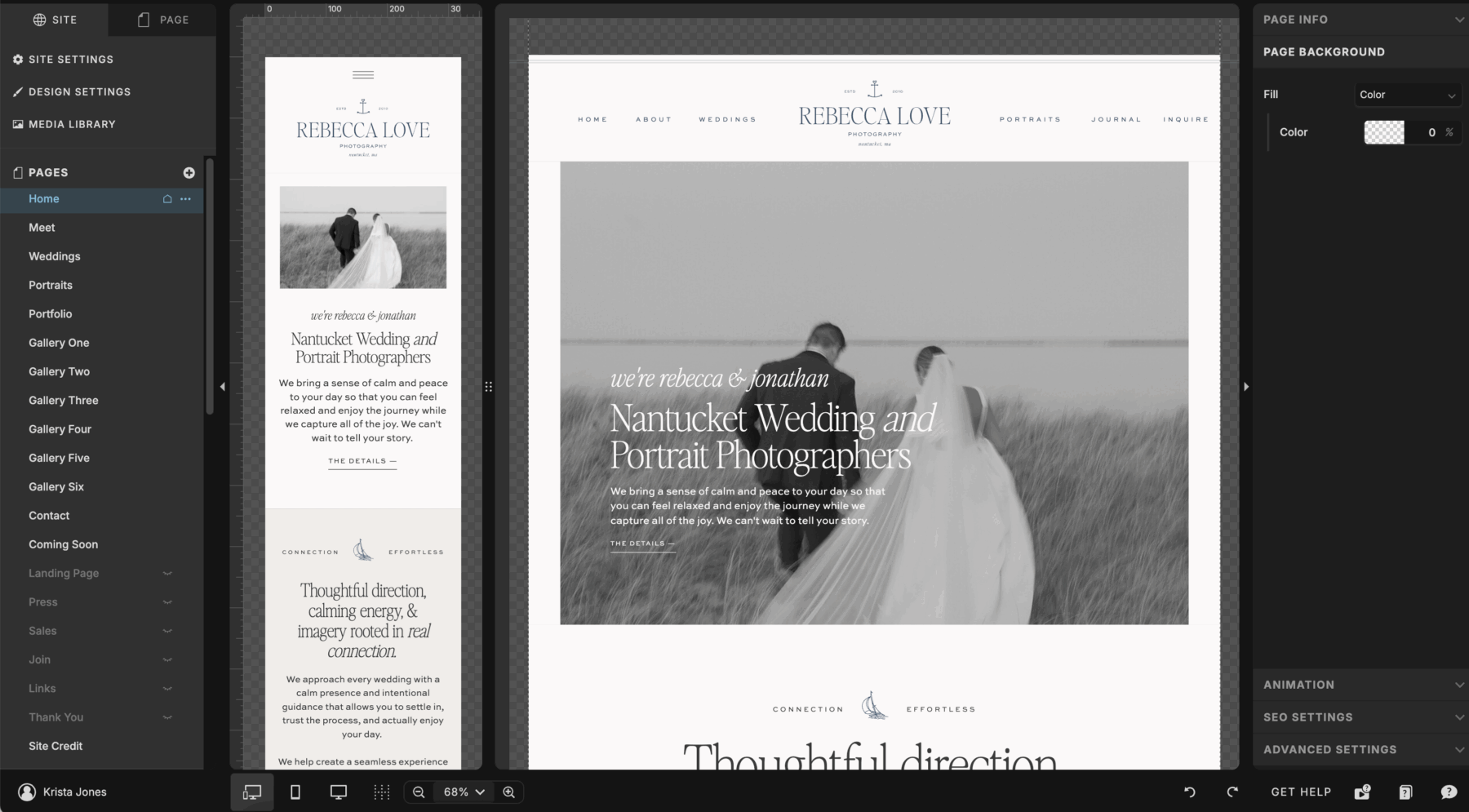
The Showit website builder is a drag-and-drop website platform that runs on a WordPress backend, combining Canva-level visual design freedom with WordPress’s blogging and SEO power. That combination is genuinely unique: you get the visual freedom of a true drag-and-drop builder paired with the blogging and SEO infrastructure that WordPress — which now powers more than 40% of all websites — has refined over two decades.
What it is not is a traditional block builder like Squarespace, or a fully coded platform like Webflow. It lives in between: more flexible than Squarespace, more accessible than Webflow, more design-forward than WordPress page builders.
It’s also not an all-in-one platform. There’s no built-in e-commerce, booking, or email marketing. You’ll integrate those separately, and I’ll cover that below.
What the Showit Website Builder Does Really, Really Well
The Showit website builder’s biggest strengths are unrestricted design freedom, full mobile control, seamless WordPress blogging, a high-quality template ecosystem, and responsive human support. Here’s how each one plays out in practice.
Design Freedom That Actually Delivers
Showit gives you complete layout freedom with no columns, blocks, or grid constraints — every element can go exactly where you want it. That’s what separates it from almost every other platform aimed at creatives. You’re not working within a structure someone else decided on.
That sounds simple, but it’s transformative for design-forward business owners. You can build layered, editorial layouts with overlapping elements, create custom hero sections that don’t look like every other site in your industry, and produce something that looks like it cost $10,000 to build — the range where custom design typically starts — without writing a line of code.
For photographers especially, this matters. Your website is your portfolio. It needs to show your work as intentionally and beautifully as the images themselves. The Showit website builder lets you do exactly that.
The Mobile Design Experience
Showit lets you design your mobile site separately from desktop, giving you complete control instead of relying on automatic responsiveness. Most platforms handle mobile automatically, which sounds great until your carefully crafted desktop layout becomes a jumbled mess on a phone.
Yes, designing mobile separately takes more time upfront. But in exchange you decide exactly what shows on mobile, the spacing, the layout, and the font sizes. Nothing gets distorted or awkwardly stacked without your say-so. With more than 60% of web traffic now coming from mobile devices, that control is genuinely valuable — and if you start from a template, the mobile work is largely done for you.
WordPress Blog Integration
Showit connects directly to WordPress for blogging, so you get WordPress’s SEO strength without having to design your site inside WordPress itself. The blogging infrastructure, the plugin ecosystem, the way search engines interact with WordPress content — it’s been refined over two decades.
Your blog posts live in WordPress. Your visual website lives in Showit. The two connect seamlessly, giving you a platform that’s genuinely strong for content marketing and long-term SEO. For anyone building a strategy around blog posts, long-form guides, or organic traffic, this matters — you’re not giving up blogging infrastructure just to have a beautiful website.
The Template Ecosystem
Showit’s template ecosystem is one of the best of any platform, because it’s built by experienced brand and web designers rather than filled with generic layouts. Most Showit templates are thoughtfully designed, with considered typography pairings and high overall quality.
Templates also make the platform far more accessible for people who don’t want to start from a blank canvas. You start with a professionally designed foundation and customize colors, fonts, images, and copy without making every layout decision yourself. In our own shop we’ve sold more than 8,000 Showit templates, and individual designs carry dozens of verified customer reviews — one customer, Winterlyn, wrote that she “was able to customize the template and publish it within 24 hours.” Full disclosure: this is our business. But I’d say the same regardless, because a well-built template is one of the most efficient paths to a strategic, beautiful website. Browse our Showit templates here.
Customer Support
Showit’s customer support is genuinely good, with live chat during business hours, a solid knowledge base, and an active user community. For a platform aimed at non-developers, responsive human support matters. If you get stuck, you’re not left searching a help forum hoping someone else had the same problem.
Where the Showit Website Builder Falls Short
Showit’s main drawbacks are a real learning curve, an ongoing subscription cost, no native e-commerce, and a canvas that can get messy if you build carelessly. None are dealbreakers for most creatives, but you should know them going in.
The Learning Curve Is Real, But It’s Manageable
Showit takes time to learn because its design freedom means there’s no automatic structure guiding you. When everything can go anywhere, you have to develop a sense of how to organize your canvas, name and group elements, and build cleanly so edits stay manageable later.
For people used to block editors like Squarespace, Showit can feel disorienting at first. But this is solvable: Showit has tutorials and a solid knowledge base, and there’s an active community sharing tips. The honest caveat — if you want zero learning and prefer to click around intuitively from day one, this probably isn’t your platform. But invest an hour of upfront learning and you’ll save yourself five hours of frustration later, plus you’ll have the skills to maintain the site yourself.
Pricing Structure
The Showit website builder costs $22 to $39 per month depending on plan, billed annually, with a free 14-day trial and no credit card required. Here’s the breakdown:
- Website-only plan — $22/month (billed annually): your Showit site, no blog.
- Basic Starter Blog — $27/month (billed annually): Showit plus a basic WordPress blog.
- Advanced Blog — $39/month (billed annually): Showit plus full WordPress blogging — what most people building a content-driven site will want.
Realistically, budget roughly $260–$470 per year for the platform, plus a domain and any paid integrations. It’s a recurring expense, not a one-and-done purchase, and if you stop paying, your published site goes offline — so build the subscription into your business budget.
No Native E-Commerce
Showit has no built-in e-commerce, so to sell products directly you’ll add a third-party integration. It doesn’t offer native selling the way Squarespace does, though it’s an area the platform continues to develop.
Most people use WooCommerce (which plugs into the WordPress backend) or embed tools like ThriveCart or Shopify buy buttons. This works fine — we do it ourselves — but it means a slightly more complex tech stack than a platform with native e-commerce. More pieces means more to manage.
The Canvas Can Get Messy
Because Showit gives you so much freedom, it’s easy to build a site that becomes hard to maintain — elements stacked on top of each other, inconsistent spacing, unnamed layers. If you’re not thoughtful about how you build, editing six months later gets frustrating.
This is less a platform problem than a best-practices one, but it’s worth naming. Building cleanly takes intention. Templates help enormously because they come pre-organized. But if you’re building from scratch without a design background, you may create headaches for future you.
How the Showit Website Builder Compares to the Alternatives
Compared to the main alternatives, Showit wins on design flexibility and creative-focused templates, while other platforms win on all-in-one convenience (Squarespace), raw power (WordPress), or developer-grade control (Webflow). Here’s each head-to-head, structured the same way.
Showit vs. Squarespace
- Verdict: Choose Showit for design flexibility; choose Squarespace for all-in-one simplicity.
- Squarespace’s strength: Easier to learn, with native e-commerce, scheduling, and email marketing built in.
- Squarespace’s weakness: You’re locked into its block-and-column system, so sites look competent but constrained.
- Best for: Squarespace suits owners who want one simple platform; Showit suits creatives who need distinctive, high-design visual presentation.
Showit vs. Self-Hosted WordPress
- Verdict: Showit gives you WordPress’s blogging power without the technical overhead.
- WordPress’s strength: Infinite flexibility and the most powerful SEO foundation available.
- WordPress’s weakness: You’re responsible for hosting, security, updates, and technical maintenance.
- Best for: Pure WordPress suits the technically inclined; Showit is the more elegant middle ground for creatives who didn’t get into business to become web developers.
Showit vs. Webflow
- Verdict: For most creative entrepreneurs, I don’t recommend Webflow — Showit gives most of the design freedom without the technical demands.
- Webflow’s strength: Technically impressive, with near-developer-level control.
- Webflow’s weakness: The interface is closer to writing code than designing visually, and the learning curve requires real technical fluency.
- Best for: Webflow suits developers and highly technical designers; Showit suits photographers, coaches, and creative service providers who want DIY-friendly design.
Showit vs. Wix
- Verdict: Choose Showit for professional, portfolio-grade design; choose Wix for the cheapest, fastest casual site.
- Wix’s strength: Very beginner-friendly, inexpensive, with many built-in features and templates.
- Wix’s weakness: Templates and output tend to look generic, and it lacks the WordPress blogging/SEO backbone Showit offers.
- Best for: Wix suits hobby or very budget-conscious sites; Showit suits creatives whose website is a serious business asset.
Who the Showit Website Builder Is Actually For
The Showit website builder is best for photographers, designers, coaches, educators, and creative service providers who care deeply about how their website looks and want a strong blogging and SEO foundation. After 10 years and 300+ custom builds, a clear pattern has emerged around who it serves well and who ends up frustrated.
It’s a great fit if you want your visual identity to feel distinct, if you’re building a content strategy, and if you’re willing to invest some time learning the platform — or if you start from a professionally designed template.
It’s probably not the right fit if you need robust built-in e-commerce out of the box, if you want a fully managed all-in-one platform handling booking, email, and payments in one place, or if your top priority is the shortest possible learning curve.
A Few Things I’d Tell Someone Starting Out
If you’re starting on Showit, follow these four steps to save yourself hours of frustration:
- Start with a template, not a blank canvas. Unless you have a strong design background, the blank canvas is overwhelming. A good template gives you a proven layout, a clean mobile design, and organized canvases that make customization far smoother.
- Spend time with Showit’s tutorials and knowledge base before you dive in. One hour of upfront learning saves you roughly five hours of frustration later.
- Be intentional about your tech stack. Decide on your integrations — contact forms, email signups, potentially e-commerce or booking — before you build, so you’re not retrofitting solutions into a half-finished site.
- Give yourself grace with the learning curve. Showit isn’t complicated the way coding is, but it has its own logic. Most people feel disoriented for the first few hours, then find their footing. That’s normal. It passes.
How Long Does It Take to Build a Showit Website?
Most people build a Showit website in a few days when starting from a template, and two to four weeks when building from scratch. Starting from a professionally designed template is by far the fastest path — one of our customers customized and published her template within 24 hours. Building from a blank canvas takes longer because you’re making every layout and mobile decision yourself, which is why I recommend a template for anyone without a design background.
Do You Own Your Website on Showit?
You own all of your content, images, and copy on Showit, and your custom domain is always yours to take elsewhere. What you’re subscribing to is the platform that hosts and displays your design, so if you cancel your subscription, your published Showit site goes offline — but your blog content lives in WordPress and remains portable. This is the same subscription model used by Squarespace, Wix, and most hosted builders, and it’s why I recommend keeping your blog on the WordPress side: it protects your most SEO-valuable content long term.
My Honest Bottom Line
After 10 years on Showit, 300+ custom builds, and more than 8,000 templates sold, the Showit website builder is genuinely one of the best platforms available for creative entrepreneurs who want a beautiful, strategic website without learning to code. The design freedom is real. The WordPress blog integration is valuable. The template ecosystem is strong. The support is good.
It’s not perfect. The learning curve asks something of you. The lack of native e-commerce adds complexity. The pricing is ongoing. And if you’re not thoughtful about how you build, you can create a site that’s harder to maintain than it needs to be.
But for photographers, designers, coaches, and creative service providers who want a website they’re genuinely proud of — one that reflects their brand at the level their work deserves — the Showit website builder earns its place. After a decade on this platform, I keep coming back to it because it lets me build things that look and feel exactly right.
If you’re ready to see what’s possible, take a look at our template shop. Every template is built with the same philosophy behind this review: beauty and strategy together, in a package that’s actually manageable to customize.
Have questions about whether Showit is right for your specific business? Leave a comment below. I read every one.
FAQ
Is the Showit website builder worth it in 2026?
Yes — for photographers, designers, coaches, and creative service providers who value distinctive design, Showit is worth it. It offers more design freedom than Squarespace and more accessibility than Webflow, backed by WordPress blogging for SEO. It’s less worth it if you need native e-commerce or the shortest possible learning curve.
Is the Showit website builder good for beginners?
It has a learning curve, so it’s not the easiest starting point for total beginners — but starting from a professionally designed template and working through Showit’s tutorials makes it very approachable. Most people find their footing within a focused weekend.
How much does the Showit website builder cost?
Plans start at $22/month billed annually for the website-only plan, $27/month for the Basic Starter Blog plan, and $39/month for the Advanced Blog plan. That works out to roughly $260–$470 per year. You can try Showit free for 14 days, no credit card required.
How long does it take to build a Showit website?
A few days from a template, or two to four weeks from scratch. Starting from a template is the fastest route — one of our customers published hers within 24 hours.
Does the Showit website builder have e-commerce?
Not natively. You can integrate Shopify, WooCommerce, or tools like ThriveCart to sell products or services. It works well but adds a layer of complexity compared to platforms with built-in e-commerce.
Can the Showit website builder rank on Google and in AI search?
Yes, and often quite well. Because Showit connects to WordPress, you have access to powerful SEO plugins like RankMath and Yoast, plus a robust blogging infrastructure built for long-term organic growth and AI-search visibility.
Do you own your website with Showit, and what happens if you cancel?
You own your content, images, and custom domain. If you cancel, your published Showit site goes offline, but your WordPress blog content remains portable — which is why keeping your blog on WordPress protects your SEO-valuable content.
Showit vs. Squarespace — which is better for photographers?
Showit is generally better for photographers because it offers unrestricted, portfolio-grade design freedom. Squarespace is easier and includes native e-commerce, but its block system limits how distinctive your site can look.
Do I need WordPress to use the Showit website builder?
Only if you want a blog. Showit works as a standalone platform for your main website; you only need WordPress for blogging functionality. Once set up, the workflow is more intuitive than it sounds.
Is there a free trial for the Showit website builder?
Yes — you can try Showit free for 14 days, no credit card required. It’s the best way to get a feel for the platform before you commit.

Krista is the co-founder of Davey & Krista, a creative studio known for high-converting Showit website templates crafted for photographers, creatives, and entrepreneurs. With over 15 years of branding and marketing experience, she helps business owners launch stunning websites without the tech overwhelm. Krista also teaches designers how to turn their creative skills into a thriving business—through templates, courses, and behind-the-scenes strategy. When she’s not designing, you’ll find her chasing sunshine, color palettes, and gluten-free pizza.
Explore website templates and free resources at daveyandkrista.com.


VIEW THE COMMENTS
Add A Comment