


Table of Contents
You’ve heard about both. Maybe you’ve had seventeen tabs open comparing them. Maybe someone in a Facebook group told you to “just use Kit” and someone else said “no, Flodesk is so much prettier” and now you’re more confused than when you started.
Sound familiar?
The flodesk vs kit question doesn’t have one right answer. But it does have a right answer for you, and that’s what we’re walking through today. Pricing, design, automation, ease of use, deliverability, and who each platform is genuinely built for.
Let’s get into it.
What Are Flodesk and Kit, Actually?
Both are email service providers: the tools you use to build your subscriber list, send newsletters, create automated sequences, and stay consistently in your audience’s inbox.
Kit (formerly ConvertKit, rebranded in late 2024) has been around since 2013. It was built for creators: bloggers, course creators, podcasters who needed something more powerful than Mailchimp without the enterprise price tag.
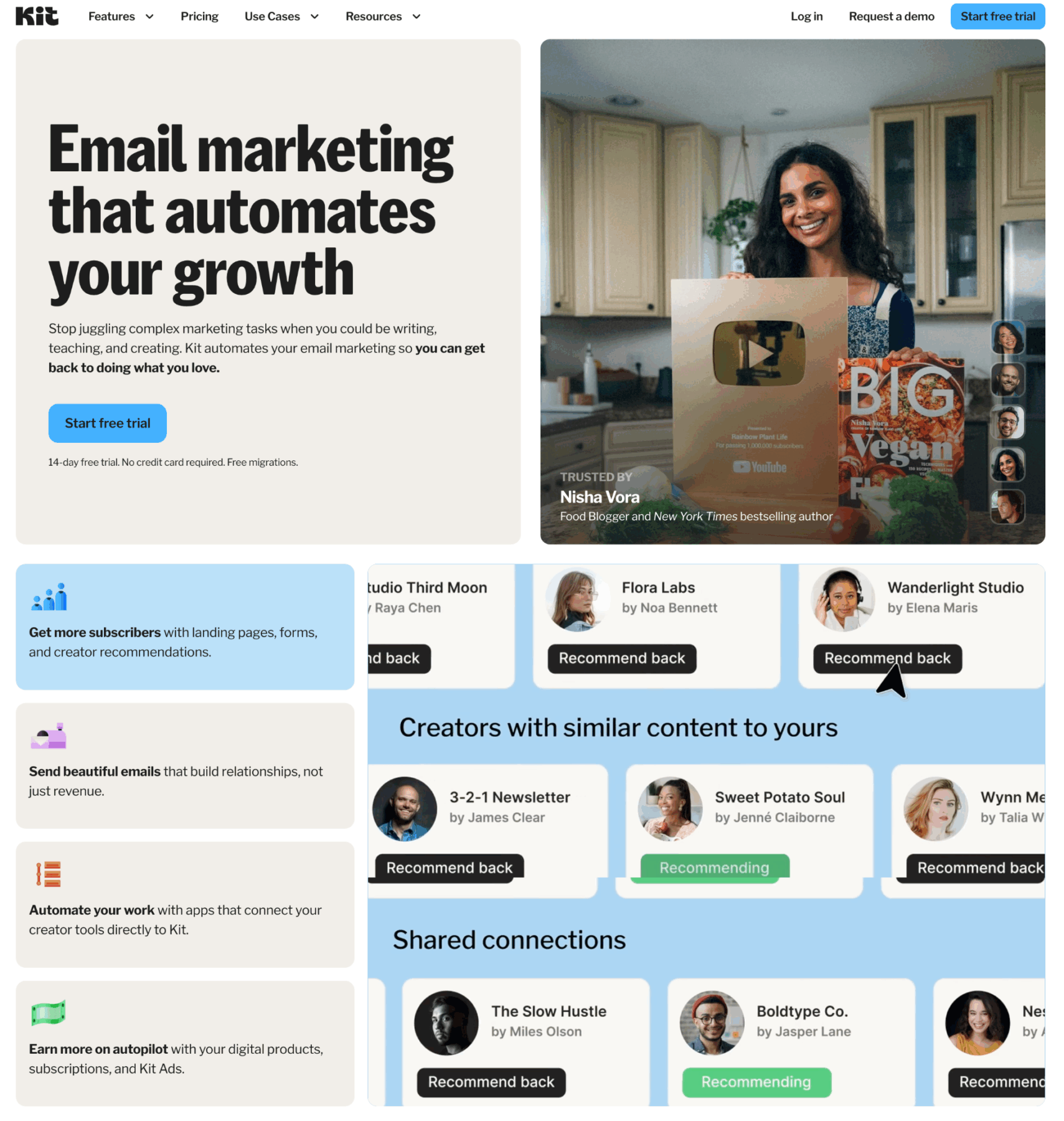
Over the years it’s grown into a full creator platform with tools for selling digital products and paid newsletters built right in. It’s known for deep automation, subscriber segmentation, and being the go-to for people who treat email as a serious growth channel.
Flodesk launched in 2018 with a completely different bet: gorgeous emails, simple workflows, one flat monthly rate no matter how many subscribers you had. Visual creatives fell in love immediately.
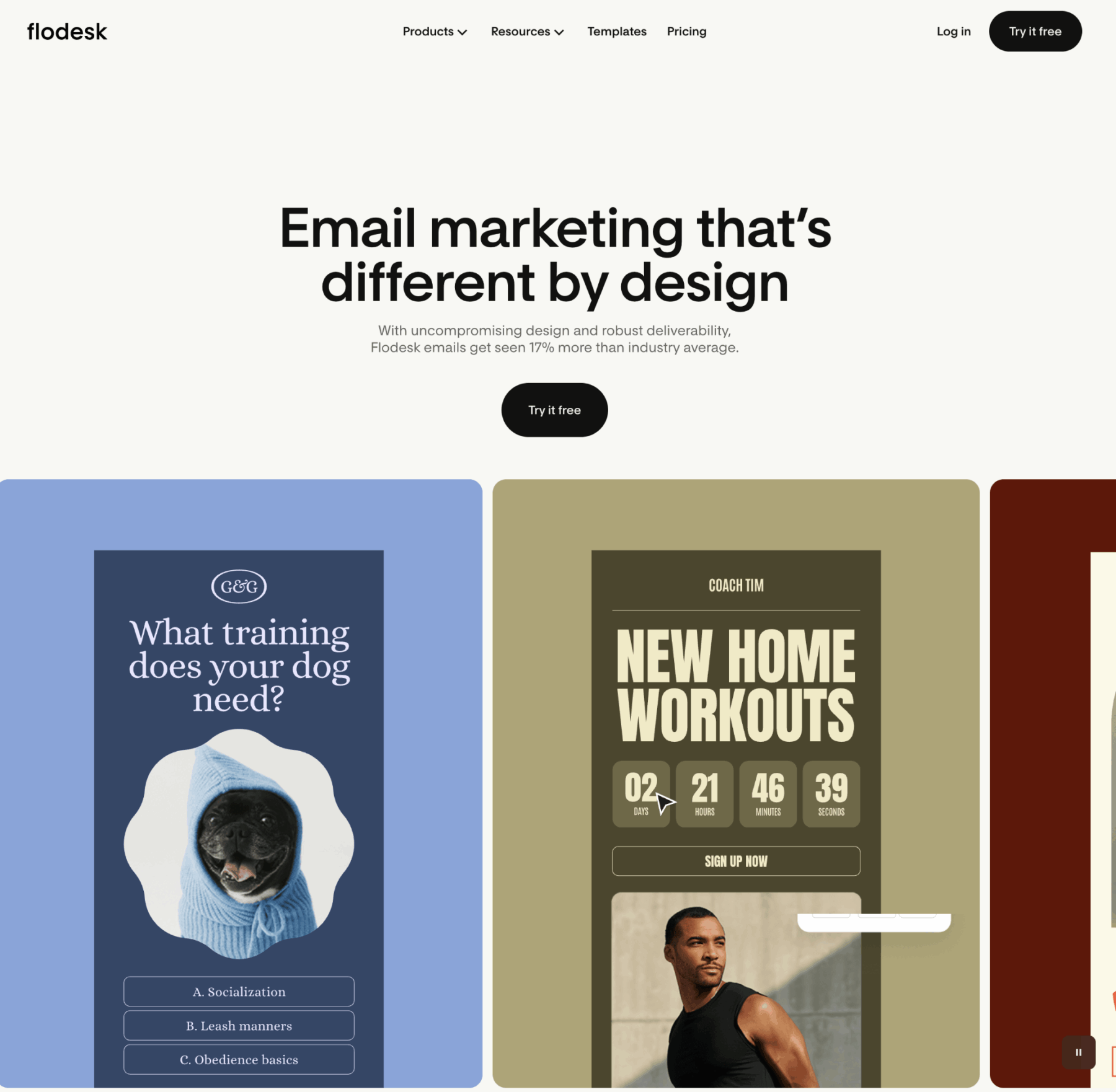
Photographers, brand designers, lifestyle entrepreneurs: anyone who wanted their emails to look like their brand without hiring a developer. Flodesk has continued to evolve, but it’s still design-first and simplicity-forward at its core.
One important thing to know before we go further: Flodesk retired that unlimited flat-rate plan in December 2025. New users are now on tiered pricing based on list size. If you were grandfathered into the old plan, you keep it as long as you don’t cancel.
But if you’re starting fresh, you’re working within the new structure, and that changes how this whole comparison reads.
Flodesk vs Kit Pricing in 2026: The Real Numbers
Kit pricing
Kit has a free plan that covers up to 1,000 subscribers. You can send broadcast emails, build basic landing pages, and set up one automation sequence. It’s a genuinely useful starting point, not a crippled trial.
The paid Creator plan starts at $33/month for up to 1,000 subscribers. At 5,000 subscribers you’re around $59/month. At 10,000, closer to $100/month. Creator Pro adds subscriber scoring, a newsletter referral system, and the ability to edit a sent email after it’s gone out. Pricing runs higher across all tiers.
Flodesk pricing (updated December 2025)
Flodesk’s free plan lets you build forms, landing pages, and a link-in-bio page. But it doesn’t include email sending. It’s a list-building tool, not a full email platform.
The Lite plan starts at $19/month for up to 1,000 subscribers. You get unlimited sends and templates, but you’re limited to one automated workflow and Flodesk branding stays on your emails.
The Pro plan starts at $25/month for up to 1,000 subscribers. Unlimited workflows, no Flodesk branding, and one digital product checkout. This is where most serious email marketers end up.
The Everything plan starts at $54/month and adds unlimited checkouts, subscriptions, upsells, and more advanced selling features.
At 5,000 subscribers, Flodesk Pro runs around $48/month. At 10,000, around $66/month. That’s significantly closer to Kit’s pricing than it used to be.
The bright spot for new Flodesk users: you can get 25% off your first year through our link. Low-risk enough to actually evaluate it properly.
| Feature | Kit | Flodesk |
| Free plan | Up to 1,000 subs, 1 automation | List-building only, no sending |
| 1,000 subscribers | ~$33/month | ~$25/month (Pro) |
| 5,000 subscribers | ~$59/month | ~$48/month |
| 10,000 subscribers | ~$100/month | ~$66/month |
| Flat-rate option | No | No (ended Dec 2025) |
| 25% discount | No | Yes, first year |
Email Design: Where Flodesk Still Wins
Flodesk wins on email design. This one isn’t close. And it’s not trying to be.
Flodesk was built from the ground up to make beautiful emails accessible to non-designers. Its layout blocks resize and reformat automatically, so your emails look polished on mobile and desktop without manual tweaking. The template library is genuinely stunning.
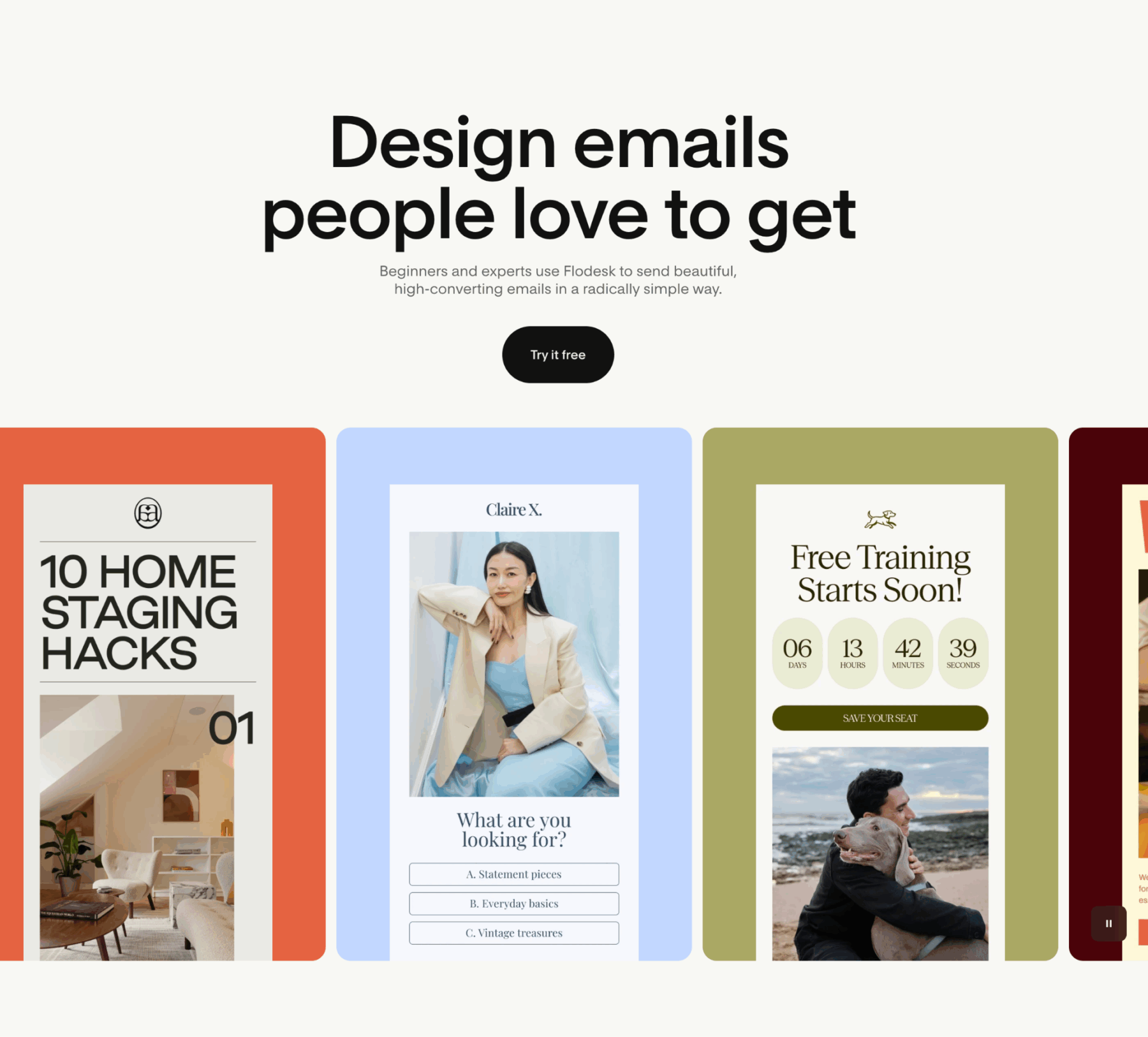
The brand kit feature is where it really shines for creatives. You drop in your logo, hex codes, and fonts once, and every email you build from there automatically starts looking like you. No fighting the template. No starting from scratch every time.
Your email is a brand touchpoint. When it looks like a generic text blast, that communicates something. When it looks like a natural extension of your website? That communicates something completely different.
Kit’s approach to design is intentionally minimal. The platform leans toward plain-text-style emails: the kind that feel personal and land reliably in primary inboxes. The visual editor has improved a lot over the years and you can make it work. But if a brand-forward email aesthetic is non-negotiable, Kit won’t be your happy place.
This isn’t a criticism of Kit. It’s a design philosophy, and there’s real logic behind it. Text-based emails often outperform heavily designed ones in deliverability and open rates. But for visual creatives? It’s still a genuine tradeoff.
Automation and Sequences: Where Kit Pulls Ahead
Kit wins on automation and sequences. If Flodesk wins on design, Kit wins on automation. Not even close.
Kit’s automation builder lets you create complex, multi-step sequences with conditional logic. Subscribers move through different paths based on what they click, what they buy, or how they found you. Tag-based segmentation gives you granular control over who gets what. A/B testing on subject lines lets you optimize over time. There’s a visual map of your entire subscriber journey so you can see exactly what happens at every step.
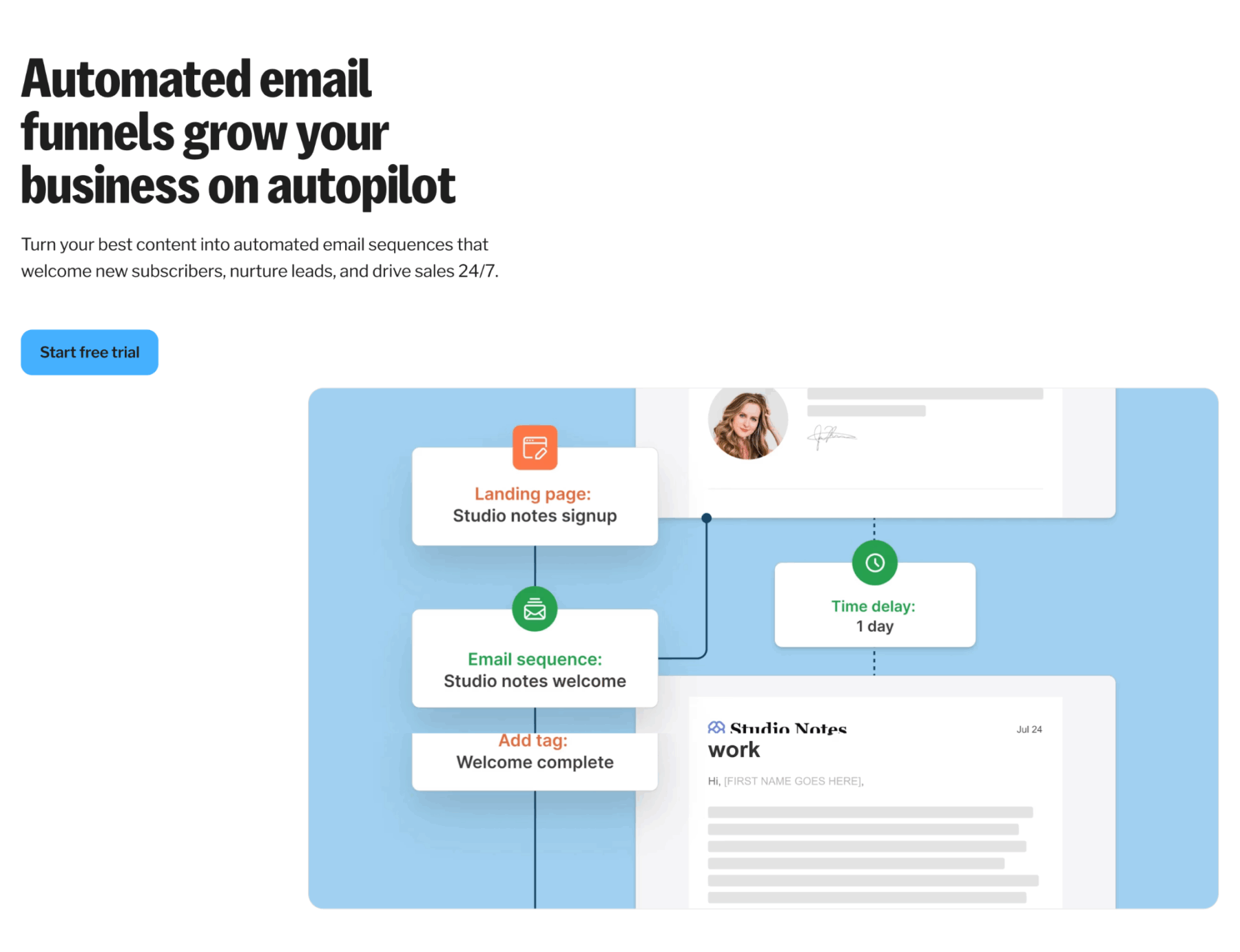
For course creators, launch-based businesses, or anyone managing a layered content funnel: this depth is hard to replicate anywhere else.
Flodesk’s workflows are intuitive and genuinely well-designed. But they’re simpler. Lite caps you at one. Even on Pro, the branching logic and conditional options don’t reach Kit’s depth.
For a photographer with a welcome sequence and a regular newsletter? That simplicity is a feature, not a limitation.
For someone running a full launch sequence with conditional email paths based on purchase behavior and tag triggers? You’ll feel the ceiling.
One Kit detail worth calling out: Creator Pro subscribers can actually edit a sent email after it’s already gone out, and the changes update in everyone’s inbox. If you’ve ever caught a broken link mid-launch, you understand the value of that.
Selling Digital Products and Monetization
Both platforms have invested in commerce features, and the gap has narrowed.
Kit includes built-in tools for selling digital products and paid newsletters on all paid plans. Transaction fee is 3.5% + 30 cents. If you want your email platform and product sales living in one ecosystem (and you’re already using something like Dubsado for client management), Kit’s integrations make that stack run smoothly.
Flodesk Checkout is included on Pro (one checkout) and unlimited on Everything. The checkout pages are beautiful and on-brand, which matters if you care about the full buyer experience. The Everything plan also adds subscription payments and abandoned cart recovery that Kit doesn’t offer natively.
For most creatives selling the occasional template or digital download, either platform works just fine. For higher-volume product sellers who want every touchpoint to match their visual brand, Flodesk’s checkout experience is worth taking seriously.
Integrations and Tech Stack
Kit integrates with a wide range of third-party tools: Shopify, WooCommerce, Kajabi, Teachable, Dubsado, plus Zapier and a full API for custom setups. For anyone running a multi-tool business stack, this integration depth is a real advantage.
Flodesk’s native integrations are more focused: Shopify, Zapier, Facebook, Instagram, Google Sheets, Typeform, WordPress, Slack, and a native ManyChat integration added in 2025 that’s worth noting. If you’re using ManyChat for Instagram automations to grow your list, Flodesk connects directly. Kit doesn’t have that native connection yet, though Zapier can fill the gap.
For most creative business owners, Flodesk’s integration list covers the main use cases. But if your business relies on direct connections with specific platforms, it’s worth verifying before you commit.
Ease of Use: Flodesk vs Kit
Flodesk is easier to use; Kit has a steeper but rewarding learning curve. The flodesk vs kit learning curve gap is real, and it matters if you’re already stretched thin running a creative business.
Flodesk is genuinely beginner-friendly. You can log in, set up your brand kit, pick a template, and send a beautiful email in under an hour. The interface is clean, the drag-and-drop builder is intuitive, and almost nothing requires technical knowledge. For creatives who already feel overwhelmed by the tech side of running a business, that’s a real relief.
Kit has a steeper learning curve: not dramatically, but noticeably. The visual automation builder is powerful but takes time to understand. Setting up tagged segments, conditional sequences, and integrations requires some intentionality upfront. Most people find that once the system clicks it becomes very efficient, but the initial setup takes more patience.
Kit does have solid documentation and an active creator community that makes the learning process easier. It’s not overwhelming. It just rewards the time you put into it.
A Note on Deliverability
Deliverability doesn’t come up as often in the flodesk vs kit conversation as it should. Whether your emails land in the primary inbox or get filtered to promotions or spam matters more than almost any design or automation decision. An email no one opens has zero impact.
Kit has a strong deliverability track record and publishes its metrics transparently. The text-first design philosophy is partly a deliverability strategy: image-heavy emails can affect inbox placement. Kit users consistently report strong open rates.
Flodesk’s deliverability has improved significantly since its early days, and most users report solid inbox placement. One thing worth knowing: Flodesk tends to be more conservative with accounts that send heavily promotional content or import large lists and immediately start sending at high volume. If you’re building organically and sending a reasonable mix of value-based content, this isn’t typically an issue.
Where We Land on the Flodesk vs Kit Question
We use Kit for the Davey & Krista business. For designers and educators who are serious about building a list that supports a course and product business (especially with multiple offers, segmented lead magnets, or regular launches), it’s hard to beat. We’ve run our own email marketing on Kit for years and have hands-on experience building in both platforms, so this comes from real day-to-day use rather than a spec-sheet comparison.
That said, we genuinely love what Flodesk does for visual creatives who are starting out or who want beautiful, simple email without the complexity overhead. If we were a photographer building a list from scratch in 2026, Flodesk is probably where we’d start, especially with that first-year discount making it low-risk to try.
Neither choice is permanent. Your list can migrate between platforms when your needs change. The most important thing is that you pick one and actually use it.
Flodesk vs Kit: Who Should Use Which
Choose Kit if:
- You’re a course creator, blogger, or educator who needs complex automation with conditional logic
- You want to A/B test subject lines and improve open rates over time
- You’re serious about email as a growth channel and need precision segmentation
- You want a generous free plan to start building before paying anything
- You’re running a multi-tool stack and need deep integrations
Choose Flodesk if:
- You’re a photographer, designer, or visual creative and your emails need to look like your brand
- You’re newer to email marketing and want to get set up and sending quickly
- You have a small-to-moderate list and want simple, predictable pricing
- A beautiful welcome sequence and a consistent newsletter is genuinely enough for where you are right now
- ManyChat is central to your list-building strategy
How to Get Started
Starting with Kit
Head to our Kit link and create your free account. The free plan supports up to 1,000 subscribers with basic features: enough to test sequences, build landing pages, and grow your list before paying anything. When you’re ready for full automation, upgrade to the Creator plan. Kit’s onboarding walks you through your first form and broadcast email, and the documentation is thorough.
Starting with Flodesk
Use our Flodesk link to start a free 14-day trial (no credit card required). When the trial ends, the Pro plan is 25% off your first year through our link. First thing after signing up: go to Account > Branding and upload your logo, colors, and fonts. Everything you build from there will automatically look like your brand.
Speaking of things you own: your website is the other one. If you’re building an email list but your site isn’t converting visitors into subscribers and clients, it’s worth taking a look at our Showit website templates. Designed for creative business owners who want a site that actually does the work.
Frequently Asked Questions
Can I migrate from Flodesk to Kit (or vice versa) later?
Yes. You can export your subscriber list from either platform as a CSV and import it into the other. You’ll need to rebuild your workflows and templates from scratch in the new platform, which takes time, but it’s absolutely doable. If you’re on Flodesk’s grandfathered unlimited plan, migrating means losing that pricing forever. Worth weighing before you switch.
Does Flodesk still have unlimited subscribers?
Only for users who subscribed before December 2, 2025. Anyone signing up after that date is on the new tiered pricing. Existing grandfathered users keep their plan as long as they don’t cancel or downgrade.
Is Kit’s free plan actually useful?
For basic list-building and newsletters, yes. The free plan supports up to 1,000 subscribers, unlimited landing pages, and broadcast emails. You’re limited to one automation sequence, which is enough to set up a welcome email but not a full nurture sequence. It’s a genuinely useful starting point before upgrading.
Which platform has better email templates?
Flodesk, and it’s not a close comparison. If visual design and brand consistency in your emails is a priority, Flodesk’s template library and brand kit feature are in a different league. Kit’s templates are functional and professional, but they’re designed to feel minimal and personal, not visually striking.
Does ManyChat work with both platforms?
Flodesk launched a native ManyChat integration in 2025, which is a big deal if you’re using Instagram automations to grow your list. Kit doesn’t currently have a native ManyChat integration (you’d need to connect them through Zapier). If ManyChat is central to your list-building strategy, that’s a real point in Flodesk’s favor.
What if I’m just starting out and not sure which to choose?
Start with Flodesk if you care about how your emails look and want to get up and running quickly. Start with Kit if you know you’ll need automation complexity and plan to build a layered content or product business.
Either way, the entry cost is low enough that switching later (while annoying) won’t cost you much more than time.
Your email list is one of the few things in your business you truly own. It’s not subject to algorithm changes or platform shutdowns. Whichever side of the flodesk vs kit decision you land on, what matters most is that you actually use it.
Ready to get started? Try Kit here or get 25% off your first year of Flodesk.
Is Flodesk or Kit better for photographers?
For most photographers, Flodesk is the better fit. Its brand kit and template library make it easy to send emails that match your visual brand, and a beautiful welcome sequence plus a regular newsletter is usually all a photography business needs. Choose Kit instead if you’re building a course or product business that needs complex automation.
Can I send emails on Flodesk’s free plan?
No. Flodesk’s free plan is a list-building tool only — it lets you build forms, landing pages, and a link-in-bio page, but it doesn’t include email sending. To send emails you need the Lite ($19/month), Pro ($25/month), or Everything ($54/month) plan. Kit’s free plan, by contrast, does let you send broadcast emails to up to 1,000 subscribers.
Which is cheaper, Flodesk or Kit?
Flodesk is cheaper at every tier. Flodesk Pro is about $25/month at 1,000 subscribers, $48/month at 5,000, and $66/month at 10,000, compared with Kit’s roughly $33, $59, and $100 at the same list sizes. With the 25% first-year discount through our link, that first year costs even less. Kit’s free plan, however, is the cheapest way to start sending at all.

Krista is the co-founder of Davey & Krista, a creative studio known for high-converting Showit website templates crafted for photographers, creatives, and entrepreneurs. With over 15 years of branding and marketing experience, she helps business owners launch stunning websites without the tech overwhelm. Krista also teaches designers how to turn their creative skills into a thriving business—through templates, courses, and behind-the-scenes strategy. When she’s not designing, you’ll find her chasing sunshine, color palettes, and gluten-free pizza.
Explore website templates and free resources at daveyandkrista.com.


VIEW THE COMMENTS
Add A Comment