


Table of Contents
Q3 is here, and inquiry season is already in motion.
Fall weddings. Back-to-school brand shoots. End-of-year business pushes. The couples, clients, and creative business owners booking right now are actively researching, which means your website is being looked at today, not eventually.
This Q3 website audit checklist isn’t about rebuilding your site from scratch. It’s about making sure the site you already have is working as hard as it should be during one of the busiest inquiry windows of the year. Some of these fixes take five minutes. Some take an afternoon. All of them matter.
Let’s get into it.
Why a Q3 Website Audit Checklist Is Worth Your Time
Most creative business owners build a website, launch it, and then quietly avoid looking at it too closely.
That’s understandable. Websites feel permanent once they’re live. But your business has changed since you launched. Your work has evolved. Your ideal client has gotten clearer. And the people landing on your site right now deserve to see the most current, most compelling version of what you do.
A Q3 website audit checklist gives you a structured way to catch the things that have slipped without requiring a full redesign. Think of it as a seasonal tune-up, not a renovation.
Here are 15 things to check right now.
1. Does Your Homepage Say What You Do in Five Seconds?
This is the most important question on any Q3 website audit checklist, and most websites fail it.
When someone lands on your homepage, can they immediately understand who you are, what you do, and who you serve? Not after scrolling. Not after reading three paragraphs. In the first five seconds.
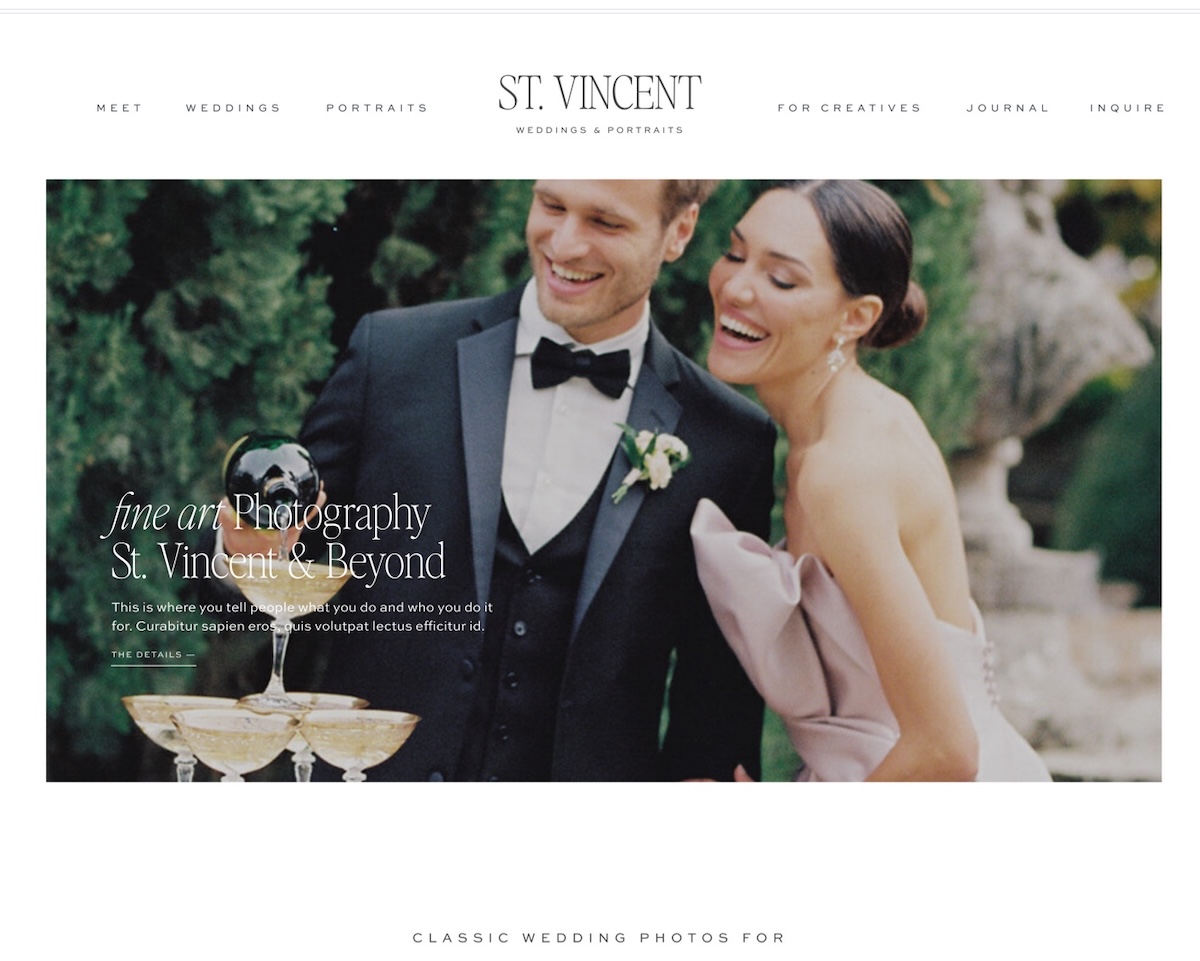
Read your hero section out loud. If it’s vague, poetic, or heavy on mood and light on clarity, it’s time to tighten it up. Your headline should tell people exactly what they’re getting.
2. Is Your Mobile Experience Actually Good?
Pull up your website on your phone right now. Not in a preview. On your actual phone, in your actual browser.
Does it load quickly? Is the text readable without zooming? Are the buttons easy to tap? Does the layout make sense, or does it feel like a shrunken desktop site?
More than half of your visitors are on mobile. If the experience isn’t good, they’re leaving. This one is worth fixing before anything else.
3. How Fast Does It Load?
Page speed affects both user experience and SEO. A site that takes more than three seconds to load loses a significant chunk of its visitors before they even see your work.
Run your site through Google PageSpeed Insights (it’s free) and note any major issues. Large uncompressed images are the most common culprit, and they’re usually an easy fix.
4. Is Your Portfolio Current?
Your portfolio should reflect the work you want more of, not the work you did three years ago.
If your best recent projects aren’t on your site yet, add them before another inquiry comes in. And if there’s old work in your portfolio that no longer represents where your business is headed, now is a good time to quietly retire it.
5. Are You Showing Full Projects, Not Just Hero Shots?
One of the most common portfolio mistakes is showing one beautiful image per project and calling it done.
Clients want context. They want to see the suite laid out, the full brand identity, the before and after, the process. Whatever your work looks like in full, show it. More depth builds more trust.
6. Are Your Testimonials Current and Specific?
Generic testimonials (“She was amazing to work with!”) don’t convert. Specific ones do.
Check your testimonials. Are they recent? Do they describe outcomes, not just feelings? If your best testimonials are buried at the bottom of your site, move them up. If you’re light on social proof, reach out to a few recent clients and ask for a quick quote.
7. Does Every Page Have a Clear Next Step?
Walk through every page of your site and ask: what is the visitor supposed to do when they reach the bottom of this page?
If the answer is nothing, there’s an opportunity. Every page should have a clear, logical next step: book a call, browse the portfolio, download the guide, view the templates. You don’t need aggressive CTAs. You just need direction.
8. Is Your Inquiry Form Working?
This one sounds obvious. It gets missed constantly.
Fill out your own contact form and make sure the submission goes through and lands where it’s supposed to. Check that your confirmation message or thank you page is set up. If you’re using a client management tool like Dubsado, make sure the workflow triggers correctly.
A broken inquiry form during peak season is a painful thing to discover after the fact.
9. Is Your Investment Information Clear Enough?
You don’t have to publish full pricing. But “starting at” information does real work on a website.It filters out clients who aren’t the right fit before they reach out, which saves you time. It signals confidence in your pricing. And it helps serious clients move forward without feeling like they’re walking into an ambush.
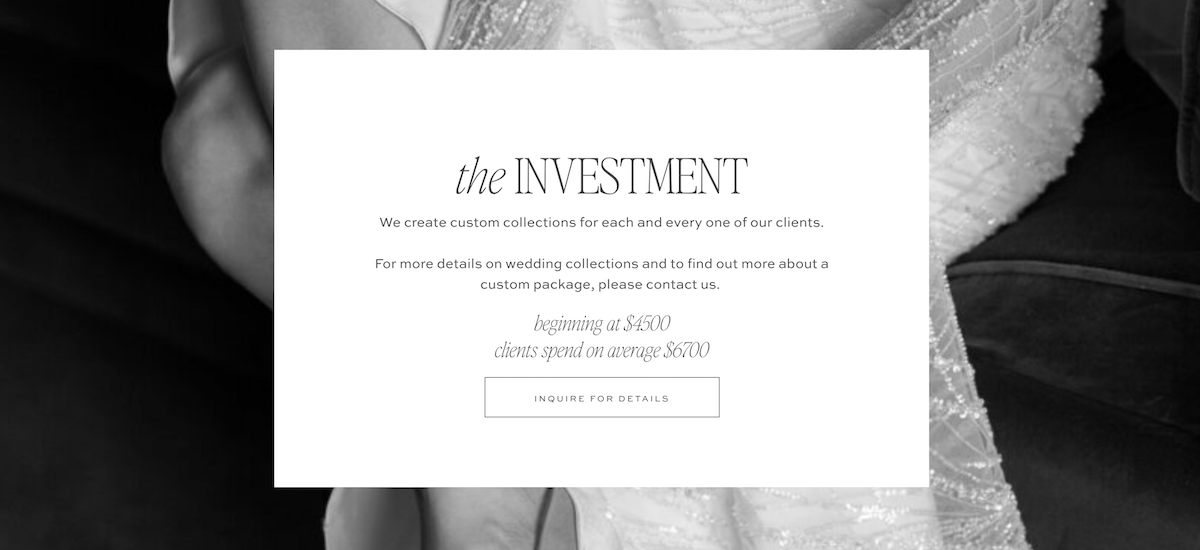
If your site has no pricing information at all, consider adding at least a starting point.
10. Are Your SEO Basics in Place?
This Q3 website audit checklist wouldn’t be complete without a quick SEO check.
Go through your main pages and make sure each one has a unique page title, a meta description under 160 characters, and alt text on your images. These are table stakes for showing up in search, and they’re often missing on creative websites.
If you’re on Showit with a WordPress blog, installing RankMath makes this process fast and straightforward.
11. Are Your Links Working?
Broken links are bad for user experience and bad for SEO.
Click through your navigation, your CTAs, your footer links, and any links inside blog posts. It takes twenty minutes and catches problems that would otherwise quietly cost you traffic and trust.
12. Is Your About Page Still Accurate?
Your About page is one of the most visited pages on your site. It’s also one of the most commonly neglected.
Check your headshot. Is it current? Check your bio. Does it still reflect who you are and what you’re focused on? Check the services or offerings you mention. Are they still what you’re selling?
An outdated About page creates a subtle disconnect that potential clients can feel even if they can’t name it.
13. Is Your Email Opt-in Still Relevant?
If you have a lead magnet or email opt-in on your site, when did you last look at it?
Is the offer still compelling for the clients you’re trying to attract right now? Is the opt-in form visible and working? Does it connect properly to your email platform, whether that’s Kit or Flodesk?
Your email list is one of the most valuable assets in your business. Make sure your site is actively building it.
14. Are Your Social Links Current?
Check every social icon in your header and footer. Make sure they go to the right profiles, that those profiles are active, and that the content someone sees when they click over is consistent with the brand experience on your site.
A social link that goes to a dormant account or a profile that doesn’t match your current positioning quietly undercuts the trust you’ve been building.
15. Do You Know What’s Actually Happening on Your Site?
The last item on any good Q3 website audit checklist is analytics.
Do you have Google Analytics or another tracking tool installed? Are you actually looking at it? Even a quick monthly check of your most visited pages, your traffic sources, and your bounce rate gives you information you can act on.
If you don’t know which pages people are leaving from, you don’t know where to improve. Data doesn’t have to be complicated. It just has to be looked at.
What to Do After Your Audit
If you went through this Q3 website audit checklist and found a few things to fix, that’s a good outcome. Most sites have gaps. The point is catching them before they cost you inquiries.
Work through your list in order of impact. A broken inquiry form gets fixed today. SEO meta descriptions can wait until next week. Portfolio updates fit into a dedicated work session.
And if your audit revealed something bigger, like a site that’s fundamentally not representing your business well anymore, that’s worth paying attention to. Sometimes the fixes are small. Sometimes the site itself has run its course.
If you’re in the second camp, our Showit templates are built to make a fresh start feel manageable, not overwhelming. Every template comes with the structure, strategy, and design already built. You’re just making it yours.
Not sure where to start with your fixes? Download our 7 Website Fixes guide for a quick-start list of the highest-impact changes you can make to your site this week.
FAQs: Q3 Website Audit Checklist
What is a Q3 website audit checklist?
A Q3 website audit checklist is a structured review of your website during the third quarter inquiry season. It covers the key areas that affect whether visitors stay, trust you, and reach out, including your homepage clarity, portfolio, SEO basics, CTAs, and technical performance.
How often should I audit my website?
At minimum, once a season. A Q3 website audit checklist review during summer catches issues while inquiry season is actively happening. A more thorough annual audit gives you a broader view of what’s working and what needs updating.
What’s the most important thing to check on my website during Q3?
Your homepage clarity and your inquiry form. If visitors can’t quickly understand what you do and who you serve, they’ll leave before they ever reach your contact page. And if your inquiry form isn’t working, none of the rest of it matters.
Do I need a new website or just updates?
That depends on what your audit reveals. If the issues are content and copy related, updates are usually enough. If the site itself is hard to navigate, looks outdated, or no longer reflects your brand, starting fresh from a well-built template is often faster and more effective than trying to patch an old site.

Krista is the co-founder of Davey & Krista, a creative studio known for high-converting Showit website templates crafted for photographers, creatives, and entrepreneurs. With over 15 years of branding and marketing experience, she helps business owners launch stunning websites without the tech overwhelm. Krista also teaches designers how to turn their creative skills into a thriving business—through templates, courses, and behind-the-scenes strategy. When she’s not designing, you’ll find her chasing sunshine, color palettes, and gluten-free pizza.
Explore website templates and free resources at daveyandkrista.com.


VIEW THE COMMENTS
Add A Comment