


Table of Contents
If you’ve ever wondered whether your Showit template is ACTUALLY helping you show up on Google, this one’s for you.
Here’s something I want you to know: a template does more for your SEO than most people realize. When it’s built well, it gives you a head start before you’ve written a single word of content. The structure is already clean, the pages are set up so Google can follow along, and the inquiry path is clear so when someone does find you, they know exactly what to do next. That’s why you want to shop for Showit templates built for SEO.
That’s exactly how we build every template at Davey & Krista. They’re built on the same foundations we teach inside our Showit SEO Course, which means the hard structural work is already done for you. You come in, add your keywords, write your content, and go.
Let me show you what that actually looks like, and which templates do this best.
Does Your Showit Template Actually Affect SEO?
Yes, and probably more than you’d expect.
I think a lot of people assume SEO is purely about the words on the page. And the words matter, they really do. But your template is quietly doing a lot of work underneath all of that, and when it’s built well, it makes everything else you do with SEO go further.
Here’s what your template is actually responsible for.
The way your pages are organized for Google to read. Think of your page like an outline. There’s one main headline at the very top, and then the sections below it use smaller headings to organize the content underneath. When these are set up in a logical order, Google can follow along and understand what your page is about. A well-built template gets this right from the start, so you’re not accidentally confusing search engines before someone even finds you.
How quickly your images load. Slow websites frustrate visitors and Google notices. Large, uncompressed images are one of the most common culprits, and a template built with optimized gallery layouts helps keep your site moving the way it should.
How your site looks and works on a phone. More than half your visitors are on mobile. Google cares about this deeply, and in Showit you design your mobile experience separately, which means the template you start from matters a lot for how that experience turns out.
Whether you can easily edit your SEO fields. Every page on your site has a place where you set a page title and a short description, which are the lines that show up when someone finds you in Google. A good template is built so those fields are easy to find and update with your own words.
What your template doesn’t control is what you actually write in those fields. The keywords you target, the content you create, the way you describe your images, that part is yours. But starting from a template with clean structure means you’re building on solid ground from day one, and that’s not a small thing.
The SEO Features Worth Looking For in a Template
When you’re browsing templates with SEO in mind, here’s what I’d actually pay attention to.
Editable page titles and descriptions. Every page should give you a clear place to write a custom title and a short description using the words your ideal client is actually searching for. This is one of the most direct ways to tell Google what your page is about.
A clear, logical heading structure. One main headline per page, with organized sections underneath it. It sounds simple, but it makes a real difference in how Google reads and understands your content.
Fast-loading, optimized image galleries. Especially important for photographers and visual creatives. Look for templates with clean gallery layouts that let your images shine without weighing your site down.
Inquiry forms in the right places. Ranking on Google is only half the job. A template that puts a clear, easy-to-find inquiry form on the right pages means the people who find you actually have somewhere to go when they’re ready to reach out.
A built-in blog page. Blogging consistently is one of the most powerful long-term SEO strategies for a creative business. A template that includes a well-designed blog from the start means you’re set up to do that without having to retrofit it later.
Every Davey & Krista template is built with all of these in place, because we’ve always believed a beautiful website and a strategic one should be the same website.
Our Most SEO-Friendly Showit Templates
Amelia Island: Best for Photographers and Creatives Building Long-Term Search Traffic
If you’re a photographer or visual creative who wants your website to keep working for you in search long after launch day, Amelia Island was built with exactly that in mind.
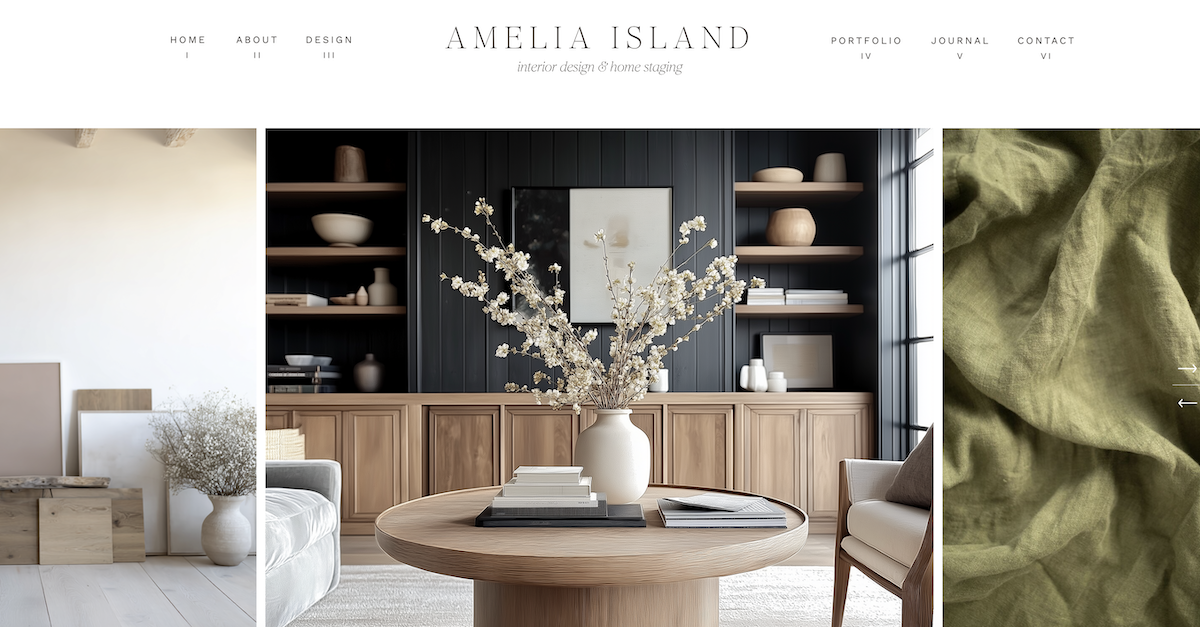
One of my favorite things about this template is that the page structure is already set up to support the kind of content strategy that actually moves the needle in search. The heading hierarchy is clean, the blog is beautifully integrated with WordPress, and the gallery layouts are designed to load quickly without sacrificing the visual impact your work deserves.
It also includes a lead magnet landing page, a portfolio section, and clear inquiry paths on every main page. So when someone finds you through Google, they have a natural, easy journey from “I found this person” to “I want to reach out.”
And if you want to go deeper on the keyword strategy and content side of things, our Showit SEO Course pairs really well with this template. The structure is already there. The course teaches you how to fill it with content that ranks.
Edisto: Best for Service Providers Who Want to Rank for Their Niche
Here’s what I love about Edisto: it proves that a focused, minimal site can absolutely compete in search when the structure is right.
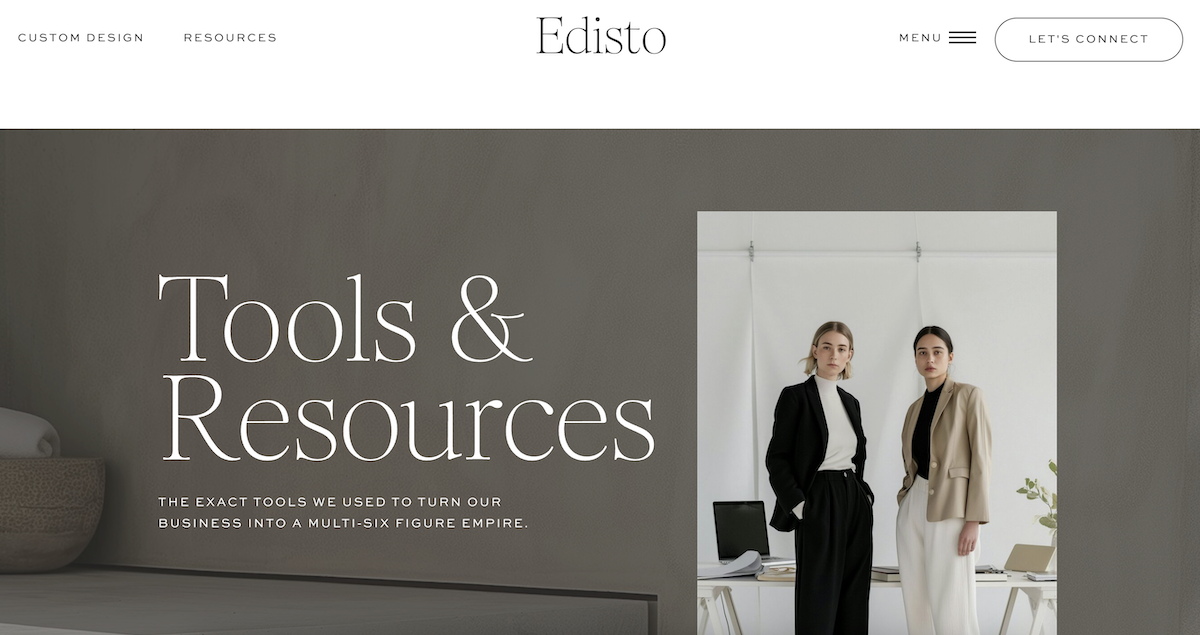
Edisto is clean and intentional, with a heading structure that’s easy to follow and service pages that are set up to be optimized for the specific terms your ideal client is searching for. Because the layout isn’t competing with itself visually, the content you write gets to do the work it’s supposed to do without distraction.
It’s also one of the fastest templates to load, which matters more than people realize. A site that loads quickly gives your visitors a better experience and gives Google a signal that your site is worth surfacing.
If you’re a coach, creative service provider, or educator who wants to show up when someone searches for exactly what you offer, Edisto gives you a genuinely strong foundation to build on.
Palm Springs: Best for Educators and Coaches With a Content Strategy
If you’re building a content-driven business and you want your site to grow with you in search over time, Palm Springs is worth a serious look.
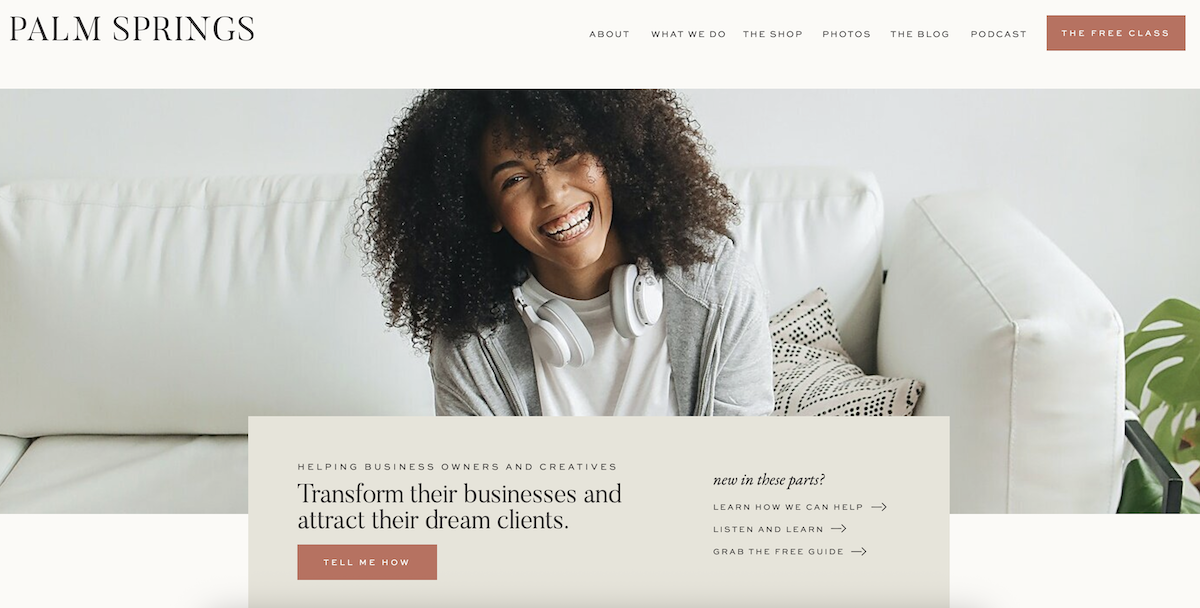
What makes this template especially strong from an SEO standpoint is the sheer number of strategically built pages it comes with. You get a home page, an about page, a services page, a long-form program sales page, a coaching page, a podcast page, a tools and resources page, a blog, a shop, and a lead magnet landing page. Each one is a new opportunity to rank for something your ideal client is searching for.
The blog is fully integrated with WordPress, which is the most powerful blogging platform available and gives you access to SEO plugins like RankMath that make optimizing each post straightforward even if you’re not technical.
More strategic pages plus a powerful blog equals more ways for the right person to find you. That’s the long game, and Palm Springs is built for it.
5 Settings to Optimize After You Install Your Template
Once your template is in place, here are the five things I’d do before you do anything else.
Set a unique page title for every page. Your page title is what shows up as the clickable headline in Google search results. Make it specific. Include what you do and where you’re based if location matters to your business. Something like “Wedding Photographer in Charleston | Your Studio Name” tells Google and your future client exactly what they’re getting.
Write a meta description for every page. This is the short paragraph that appears under your page title in search results. Keep it under 160 characters and write it for a real person, not an algorithm. Think of it as a one-sentence invitation for someone to click through to your site.
Add alt text to every image. Alt text is a short description you write for each image on your site. It helps Google understand what your images are about, and it makes your site more accessible for everyone. For photographers especially, this is a significant opportunity that often gets skipped.
Compress your images before you upload them. We have a full guide on how to do this with TinyJPG here. It takes a few extra minutes and makes a real difference in how quickly your site loads.
Connect Google Search Console. Google Search Console is a free tool from Google that shows you what searches your site is showing up for, which pages are getting the most visibility, and where there might be technical issues to fix. Setting it up is one of the best things you can do for your site right after launch, and it gives you data you can actually act on as your site grows.
If you want to go much deeper on all of this, including keyword research, content strategy, and how to optimize every page of your Showit site for search, our Showit SEO Course walks you through the whole process with 50 step-by-step video lessons. It’s one of the things I’m most proud of that we’ve built, because it takes something that can feel overwhelming and makes it genuinely doable.
Ready to Build a Site That Works for You in Search?
If you’ve been putting off SEO because it felt too technical or too time-consuming, I hope this helped make it feel a little more approachable. The truth is, starting from the right template takes a lot of that weight off your plate.
The structure is already there. The inquiry paths are already in place. You just need to show up, add your words, and let your site do its job.
Browse all Davey & Krista Showit templates here and find the one that fits your business. And when you’re ready to go deeper on the SEO side, the Showit SEO Course is there waiting for you.
FAQs
Is Showit good for SEO?
Yes, genuinely. Showit integrates with WordPress for blogging, which is one of the most search-engine-friendly platforms available. It also gives you full control over page titles, meta descriptions, and alt text, and you can design your mobile experience separately to make sure it’s exactly right. Many Davey & Krista customers have ranked on the first page of Google using their Showit sites.
Do templates hurt SEO?
A well-built template actually supports your SEO by giving you a clean structure, optimized gallery layouts, and clear inquiry paths from day one. Davey & Krista templates are built with SEO foundations already in place, so you’re starting from solid ground rather than having to fix structural issues later.
How do I optimize a Showit site for Google?
Start with your page titles, meta descriptions, and image alt text on every page. Then connect Google Search Console so you can see how your site is performing in search. From there, consistent blogging around the keywords your ideal client is searching for is one of the most powerful long-term strategies available. Our Showit SEO Course covers all of this step by step.
Will a template help me show up in AI search?
A well-structured template with clear headings, organized content, and specific answers to the questions your ideal client is asking gives AI search tools more to work with when they’re deciding what to surface. At Davey & Krista, we build our templates with this kind of content clarity in mind, so your site is set up to be understood by both Google and the AI tools that are increasingly shaping how people find businesses like yours.

Krista is the co-founder of Davey & Krista, a creative studio known for high-converting Showit website templates crafted for photographers, creatives, and entrepreneurs. With over 15 years of branding and marketing experience, she helps business owners launch stunning websites without the tech overwhelm. Krista also teaches designers how to turn their creative skills into a thriving business—through templates, courses, and behind-the-scenes strategy. When she’s not designing, you’ll find her chasing sunshine, color palettes, and gluten-free pizza.
Explore website templates and free resources at daveyandkrista.com.


VIEW THE COMMENTS
Add A Comment