


Table of Contents
You CAN launch your Showit website this weekend.
I mean that. Not someday, not when things calm down, not when you feel more ready. This weekend.
Here’s the simple version of how it works. You’re going to spend two focused days on your site.
The first day is about getting the big things in place: picking a design you love, writing the words that go on each page, and adding your photos.
The second day is about the finishing touches, making sure everything looks great on a phone, setting up a few basics so Google can find you, and hitting publish.
That’s it. And I’m going to walk you through every single step.
I’ve been helping people get their Showit sites live for fifteen years at Davey & Krista, and the thing I want you to know right now is this: you don’t need a design background, you don’t need to know how to code, and you don’t need to feel completely ready. You just need a focused weekend and the right starting point.
Let me show you exactly what that looks like.
Can You Really Launch a Showit Website in One Weekend?
Yes. And here’s why it’s more achievable than you might think.
When you build from a strategically designed template, the hard decisions are already made for you. The layout is already proven. The page flow is already built around how someone moves through a website. And every Davey & Krista template comes with writing prompts built into the starter copy, so you’re filling in your story, not staring at a blank page wondering what to write.
That’s what makes the weekend timeline real. Even if this is your very first website.
What Should I Have Ready Before Saturday?
Think of this as your Friday evening prep, and I promise it’s simpler than it sounds.
Getting these five things ready before the weekend starts is what lets Saturday feel calm and focused instead of scattered.
- A registered domain. Your domain is your website address, something like yourbusinessname.com. We recommend Namecheap for this. It’s affordable, straightforward, and their support team is genuinely helpful.
- A Showit account. If you’re brand new to Showit, start your free 30-day trial here. No credit card required, and 30 days gives you plenty of runway to build, test, and launch without any pressure.
- Your brand colors and fonts. Even just one hex code and a font name is a great starting point. On day two, you’ll drop these into Design Settings and they’ll update your entire site at once. We have a full walkthrough on how to do this here if you want to get familiar with the process before the weekend.
- A folder of compressed images. Gather your photos, whether they’re your own work, stock images, or a mix, and run everything through TinyJPG before the weekend. Compressing your images just means making the file sizes smaller so your site loads quickly for anyone who visits. We have a full walkthrough on how to do that here.
- A rough copy doc. Copy is just the word we use for the words on your website. Open a Google Doc and jot down your homepage headline, a short bio, what you offer, and who you help. If you’re not sure where to start, try dropping a few notes about your business into ChatGPT or Claude and asking it to help you draft each section. It doesn’t need to be perfect. It just needs to exist before Saturday.
Friday-you is going to be SO glad Saturday-you did this.
Day One: Choose, Write, and Fill
Morning: Pick the Right Template
Give yourself about an hour here. This is the most important decision of the weekend, and it’s worth doing slowly with something good to drink.
Head to the Davey & Krista template shop and look for two things: a design that feels like your brand, and a page layout that fits your type of business.
If you’re a photographer, Amelia Island was built with you in mind. It’s visual-heavy with generous gallery space and a natural flow that lets your images do the storytelling. If you’re a stationer or a detail-driven creative, Bellagio is worth exploring. It was designed specifically around how stationery businesses work, with structured pages for showcasing your suites and walking a potential client through your process.

Here’s something I always tell anyone choosing a template: pick based on structure, not color. Colors take about ten minutes to update in Showit. Structure takes longer to adjust. Find the layout that fits your business first, then make everything else yours.
Once you purchase your template, you’ll find a share key inside your PDF. Think of it as a code that copies your template right into your Showit account. Paste it in under Add to Library and you’re ready to build.
Afternoon: Add Your Copy Using the Writing Prompts
Here’s where it starts to feel really real.
Every Davey & Krista template comes with writing prompts built right into the starter copy. These are your guides for each section of the page, showing you what kind of message belongs there and what your visitor needs to understand at that point in order to feel confident reaching out to you.
Work through each page in order. Homepage first, then services or portfolio, then about, then contact.
The most important thing I want you to hold onto here: edit the prompts, don’t delete them and start over. The structure is already built to work. Your job is to fill it with your story. When you finish a section, read it out loud. If it doesn’t sound like something you’d actually say to someone, adjust it until it does.
And if you get stuck on a section, try pasting the prompt into ChatGPT or Claude along with a few sentences about your business. It can give you a solid first draft to work from.
Evening: Images and Galleries
Pull from that folder of ready-to-go images you prepped on Friday and drop them into each section across your pages.
Fill every gallery, even if some spots feel like placeholders for now. Seeing your actual work in the layout helps you understand how everything is coming together, and a site with real images in place is so much easier to review than an empty one.
By the end of Day One, your site should have real words and real images on every main page. It won’t be perfect yet, and that is completely okay. It will be there, and that feeling heading into Sunday is everything.
Day Two: Polish, Optimize, and Publish
Morning: Colors, Fonts, and Mobile
Start Sunday morning in Design Settings. This is where you drop in your brand colors and fonts globally, meaning they update across your entire site at once.
It’s one of my favorite things about Showit. In about ten minutes, your template starts feeling unmistakably like your site. If you want a step-by-step guide for this, we have a full walkthrough on how to customize your Showit website here.
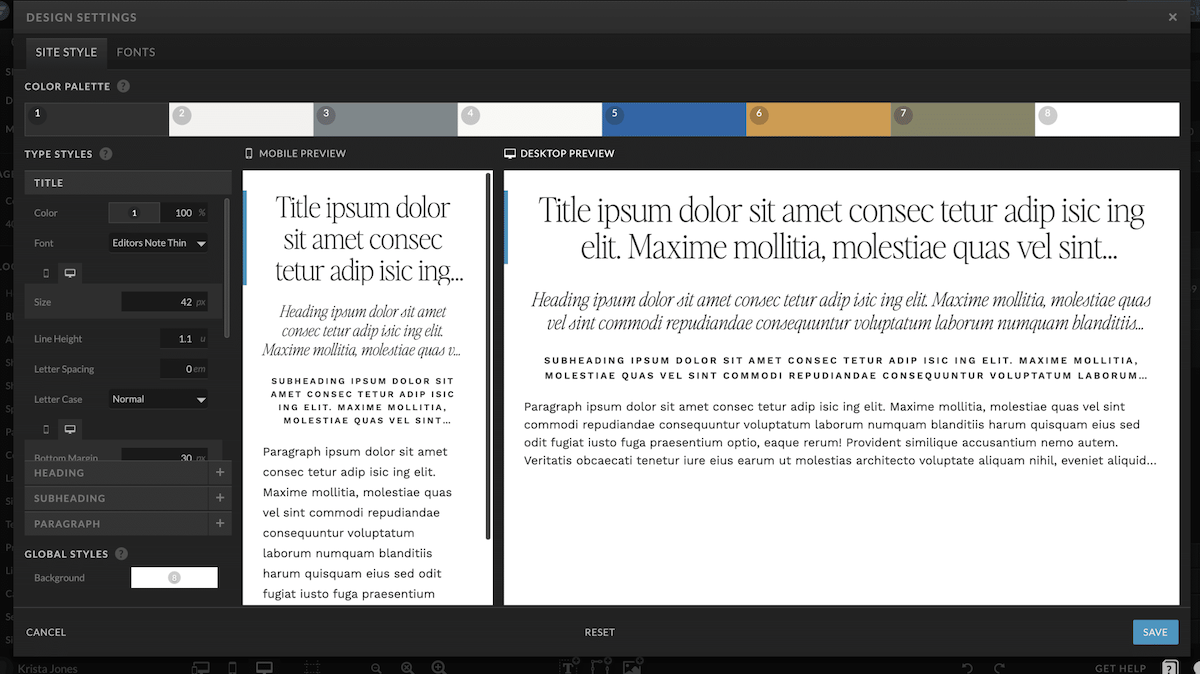
Once your colors and fonts are in, switch over to mobile view.
In Showit, you design how your site looks on a phone separately from how it looks on a computer screen. That’s actually a really powerful feature because it means you have full control over the mobile experience. Go through every page in mobile view, check that your text is easy to read, your buttons are easy to tap, and nothing feels cramped or cut off. Fix anything that looks off now, before your visitors see it.
Afternoon: SEO Basics
SEO stands for search engine optimization, which is just a way of saying “helping Google understand what your site is about so it can show your site to the right person at the right time.”
You don’t need to be an expert to get the basics right. For every page on your site, set these three things:
A page title. This is what shows up in Google search results. Include what you do and where you’re based. Something like “Wedding Photographer in Austin | Your Studio Name.”
A meta description. A sentence or two describing what’s on the page. Keep it under 160 characters and write it like you’re talking to a real person.
Image alt text. A short description of each image. This helps Google understand your photos and makes your site more accessible for everyone.
If you’ve connected WordPress to your Showit account for blogging, install RankMath. It walks you through the SEO settings for every page in a really clear, beginner-friendly way.
When you’re ready to go deeper on SEO, our Showit SEO Course breaks the whole process down into simple steps built specifically for Showit websites. For launch day, though, those three settings above are all you need.
Evening: Run the Launch Checklist and Go Live
Before you submit your launch request, take thirty minutes and go through this checklist. Every single item.
- Fill out your own contact form and confirm the submission lands in your inbox
- Click every link in your navigation and your footer
- Read every page out loud, slowly, for typos
- Make sure your inquiry form is connected to your email platform, whether that’s Kit or Flodesk
- Set up Google Analytics so you’re capturing visitor data from day one
- Walk through every page on your actual phone one final time
When everything feels good, go to Site Settings in Showit and submit your launch request. The Showit team connects your domain for you, which is genuinely one of the things I love most about this platform. It typically takes up to 48 hours, so submit Saturday evening and you’ll usually be live by Monday morning.
You built and launched your website in a weekend. That is a really big deal.
The 5 Mistakes That Stall a Weekend Launch
I’m sharing these not to overwhelm you, but because knowing them in advance means you can sidestep them completely.
Rewriting your copy from scratch. The writing prompts are there because they work. Edit what’s already there. Starting from a blank page is where weekends turn into months.
Spending too long customizing before your content is in. Get your real words and real images in place first. Then adjust the design around your actual content.
Skipping the mobile view. More than half of your visitors will see your site on their phone. This step is worth every minute it takes.
Skipping the SEO basics. Page titles and meta descriptions take about thirty minutes across your whole site. It’s a small investment for a big return over time.
Not testing your contact form. If your form isn’t working, your site is technically live but not actually open for business. Always test it before you share your site with anyone.
After You Launch: Turn Visits Into Inquiries
Your site is live. Here’s what to focus on next.
Connect your contact form to a client management tool like Dubsado so new inquiries trigger a welcome email automatically. If you’re building your email list, make sure your BDOW! opt-in is connected and delivering your lead magnet correctly.
Then share your site with the world. Send an email to your list. Post on social media. Tell the people in your life. You put in real work this weekend and your site deserves to be seen.
If you want a complete step-by-step walkthrough with video lessons, a copy workbook, and downloadable resources, The Launch Plan is built around this exact weekend framework. And if you’re still looking for your template, browse the Davey & Krista shop here. Every template includes writing prompts and a launch checklist so you’re never starting from nothing.
FAQs
How long does it really take to build a Showit website?
With a strategically built template and your content prepared in advance, most people can build and launch their Showit website in one focused weekend. The design moves quickly. What takes the most time is writing your copy and gathering your images, which is why preparing those before Saturday makes the whole timeline genuinely achievable.
Do I need to know how to code to use Showit?
Not at all. Showit is a drag-and-drop website builder, which means you move things around visually and update your text directly on the page. There’s no coding involved, and it’s designed to be approachable even if you’ve never built a website before.
Can I launch a Showit website without hiring a designer?
Absolutely. Davey & Krista templates are built specifically for DIY launches, with writing prompts and launch checklists included so you have support at every step. The Launch Plan also walks you through the full process with video guidance if you want extra help along the way.
What is the fastest Showit website template to launch?
Templates with built-in writing prompts and a clear page structure launch the fastest because you’re filling in your content rather than building everything from scratch. Davey & Krista templates like Amelia Island and Bellagio include writing prompts, a launch checklist, and a walkthrough video with every purchase.

Krista is the co-founder of Davey & Krista, a creative studio known for high-converting Showit website templates crafted for photographers, creatives, and entrepreneurs. With over 15 years of branding and marketing experience, she helps business owners launch stunning websites without the tech overwhelm. Krista also teaches designers how to turn their creative skills into a thriving business—through templates, courses, and behind-the-scenes strategy. When she’s not designing, you’ll find her chasing sunshine, color palettes, and gluten-free pizza.
Explore website templates and free resources at daveyandkrista.com.


VIEW THE COMMENTS
Add A Comment